# Security Copilot Agents
Welcome to the Security Copilot Agents documentation. This collection of specialized agents helps you automate security operations, optimize configurations, and gain deeper insights into your Microsoft 365 and Azure environments.
### What Are These Agents?
Security Copilot Agents are intelligent automation tools that integrate with Microsoft Security Copilot to perform complex analysis, identify issues, and provide actionable recommendations. Each agent specializes in a specific area of security, compliance, or IT operations.
Think of them as expert consultants who can analyze your environment in minutes and tell you exactly what needs attention.
### Available Agents
#### Identity & Access Management
* [**Assignment Insights**](/agents/assignment-insights/overview) - Analyzes and optimizes Intune policy and application assignments
* [**PIM Insights**](/agents/pim-insights/overview) - Comprehensive analysis of Privileged Identity Management activations
* [**Privileged Admin Watchdog**](/agents/privileged-admin-watchdog/overview) - Identifies and removes standing administrative privileges
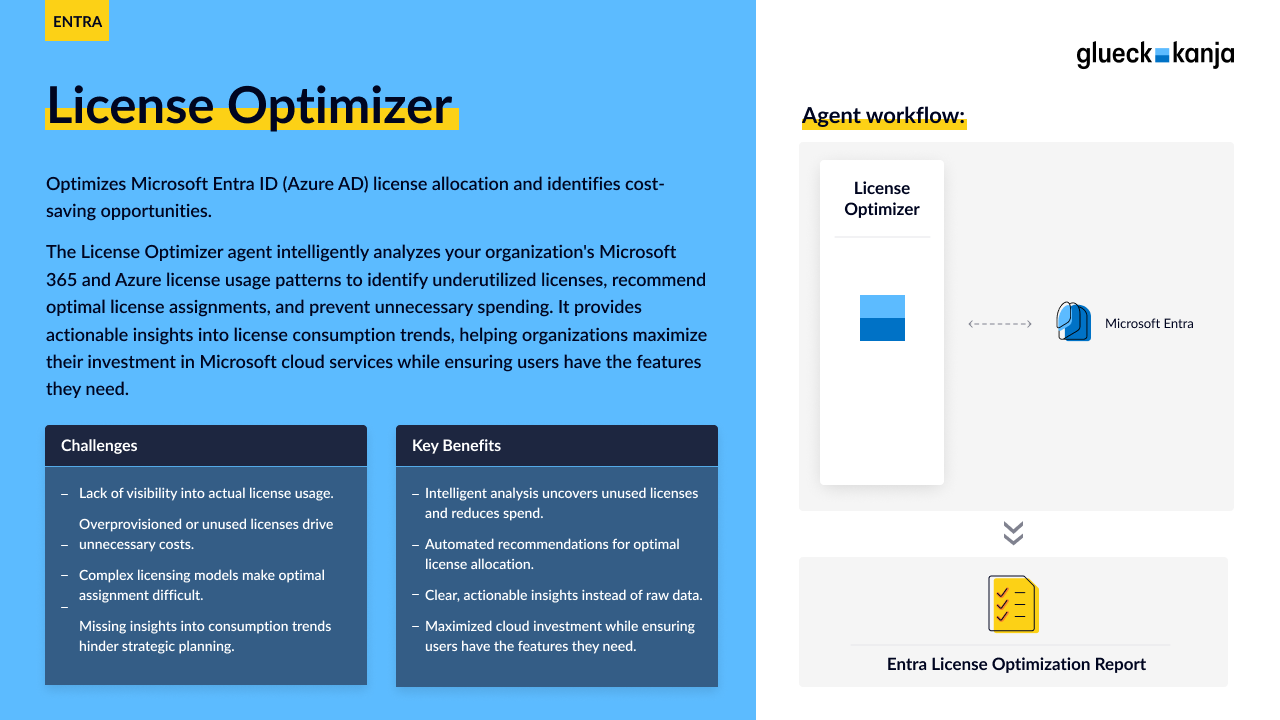
* [**License Optimizer**](/agents/license-optimizer/overview) - Optimizes Microsoft 365 license allocation and identifies cost savings
* [**GSA Reporting & Assignment Agent**](/agents/gsa-reporting-and-assignment-agent/overview) - Detects degraded connectors, stale IP ranges, orphaned assignments, and unusual traffic behaviors.
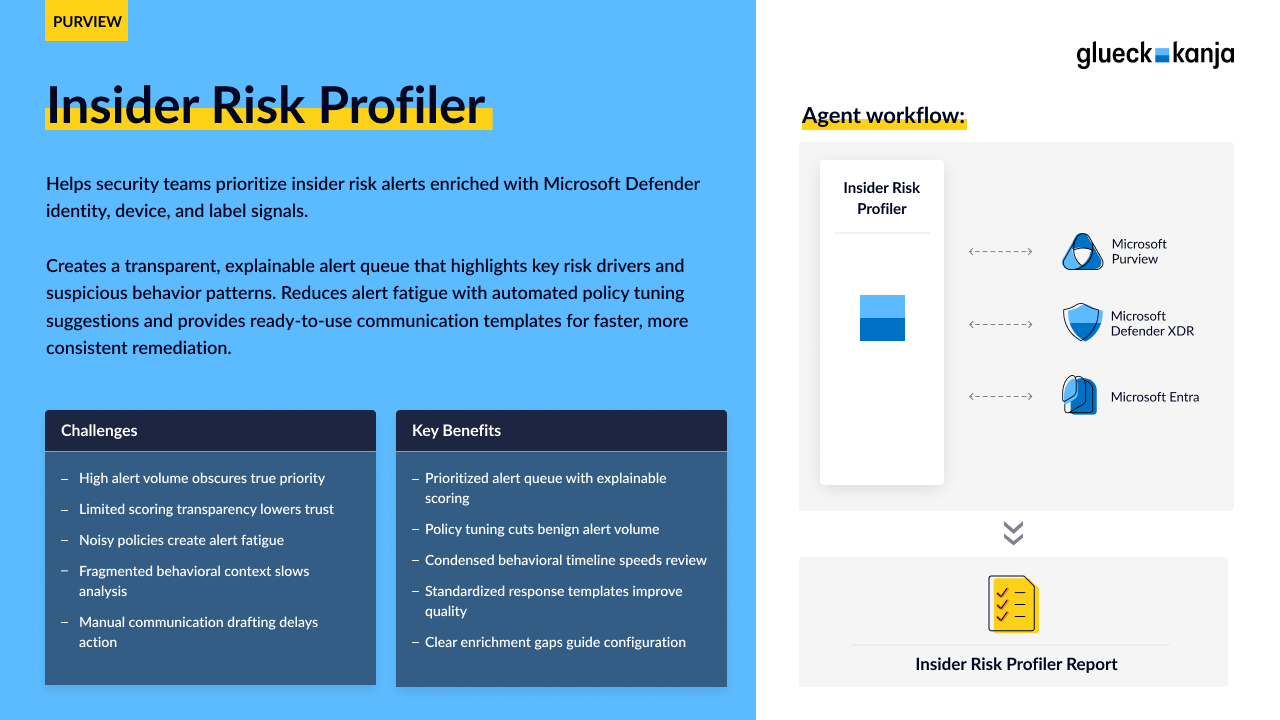
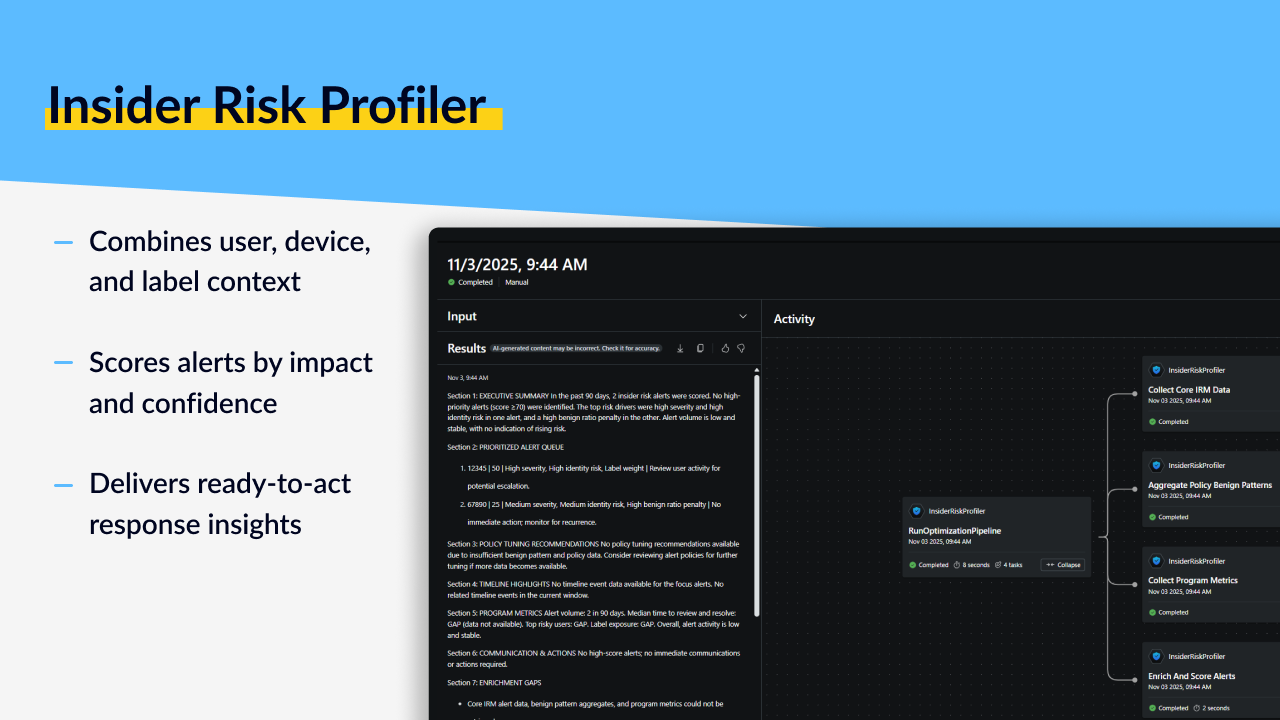
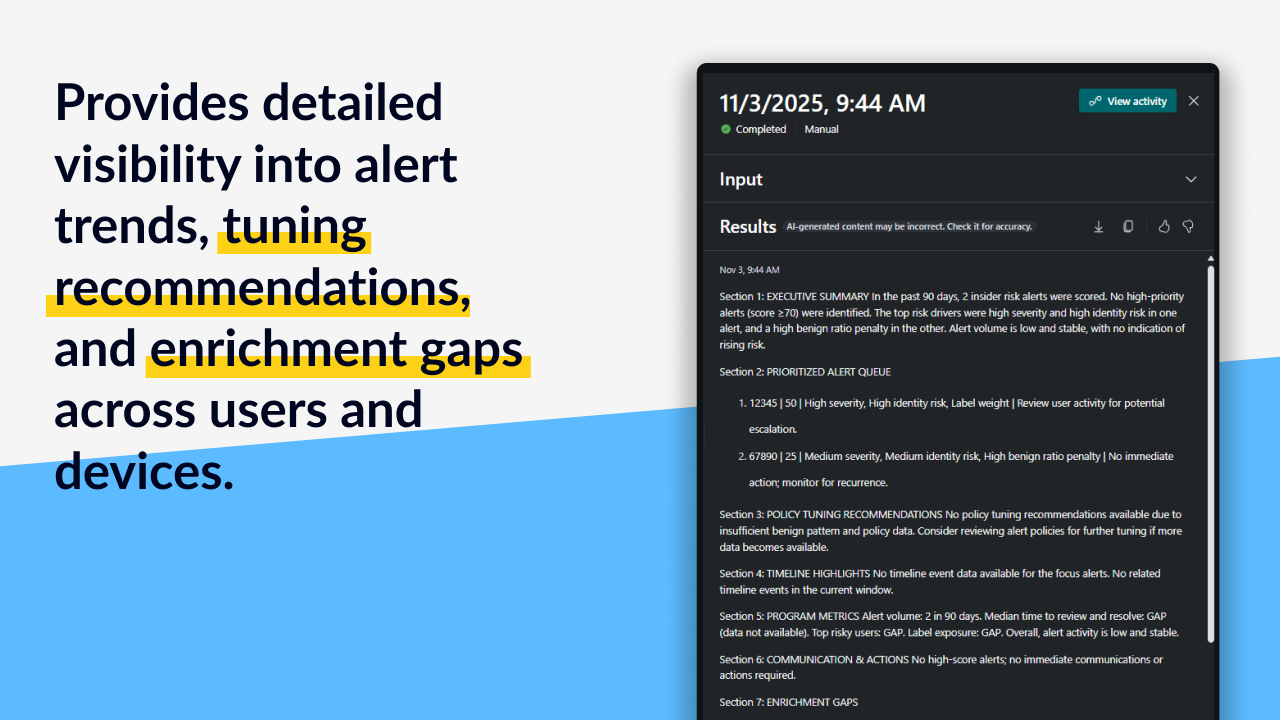
* [**Insider Risk Profiler**](/agents/insider-risk-profiler/overview) - Enriches IRM alerts with identity risk, device compliance, and data protection signals
#### Compliance & Governance
* [**Compliance Assistant**](/agents/compliance-assistant/overview) - Automated DPB and GDPR compliance assessment with gap analysis
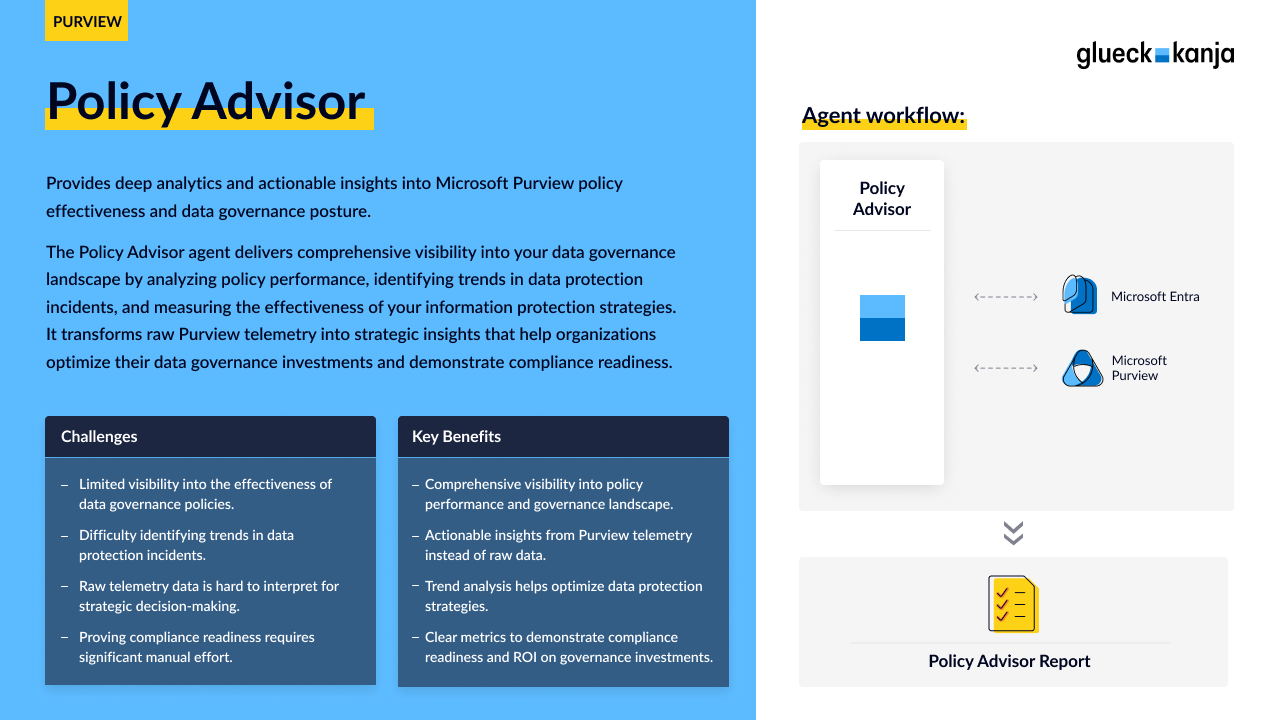
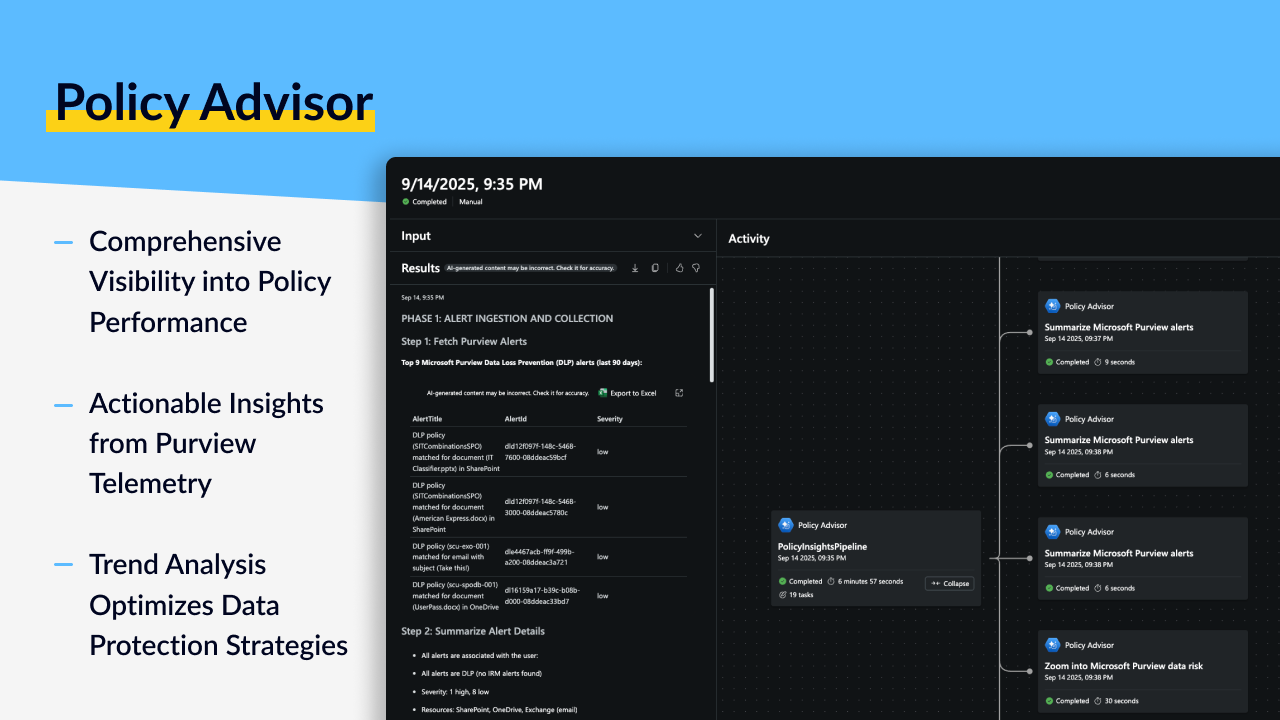
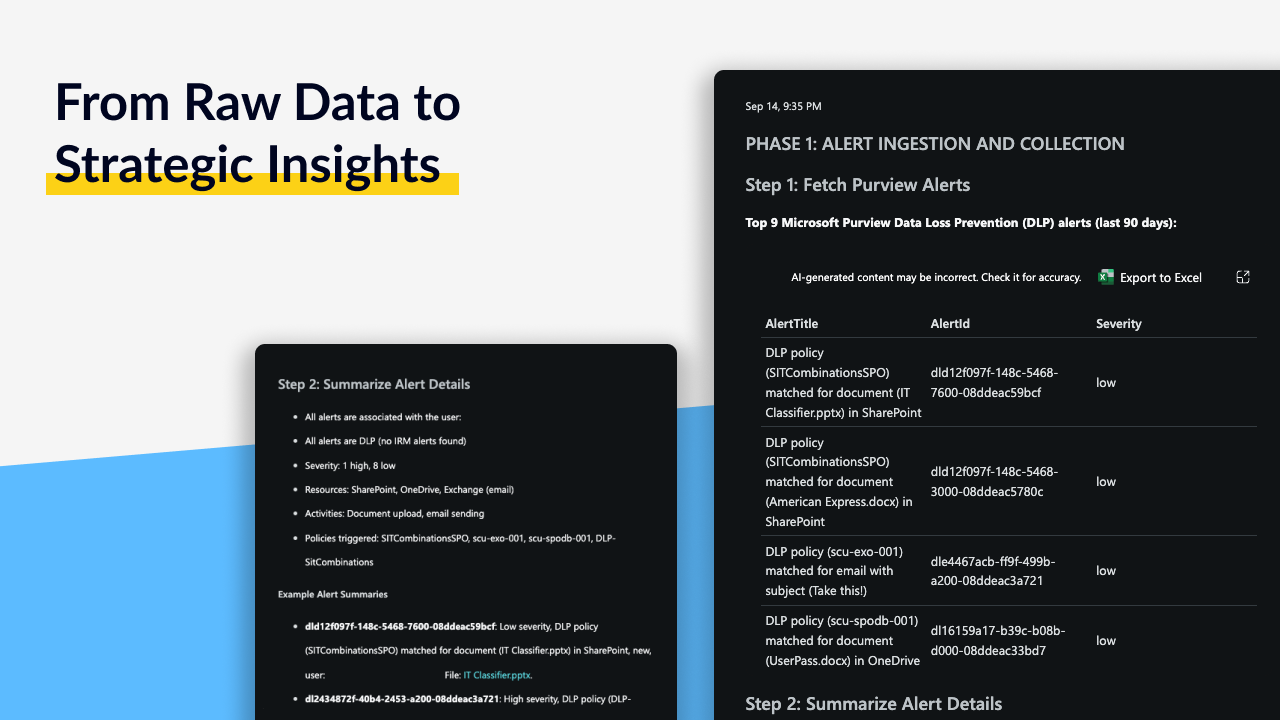
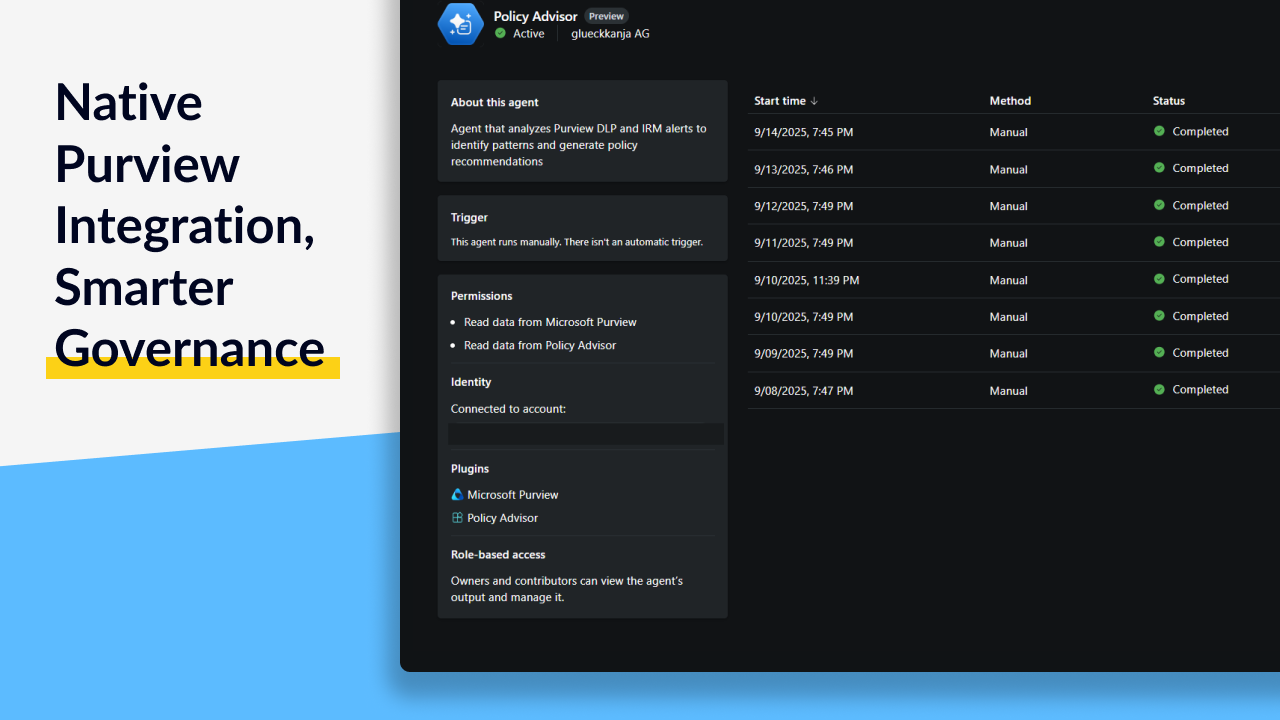
* [**Policy Advisor**](/agents/policy-advisor/overview) - Deep analytics into Purview policy effectiveness and data governance
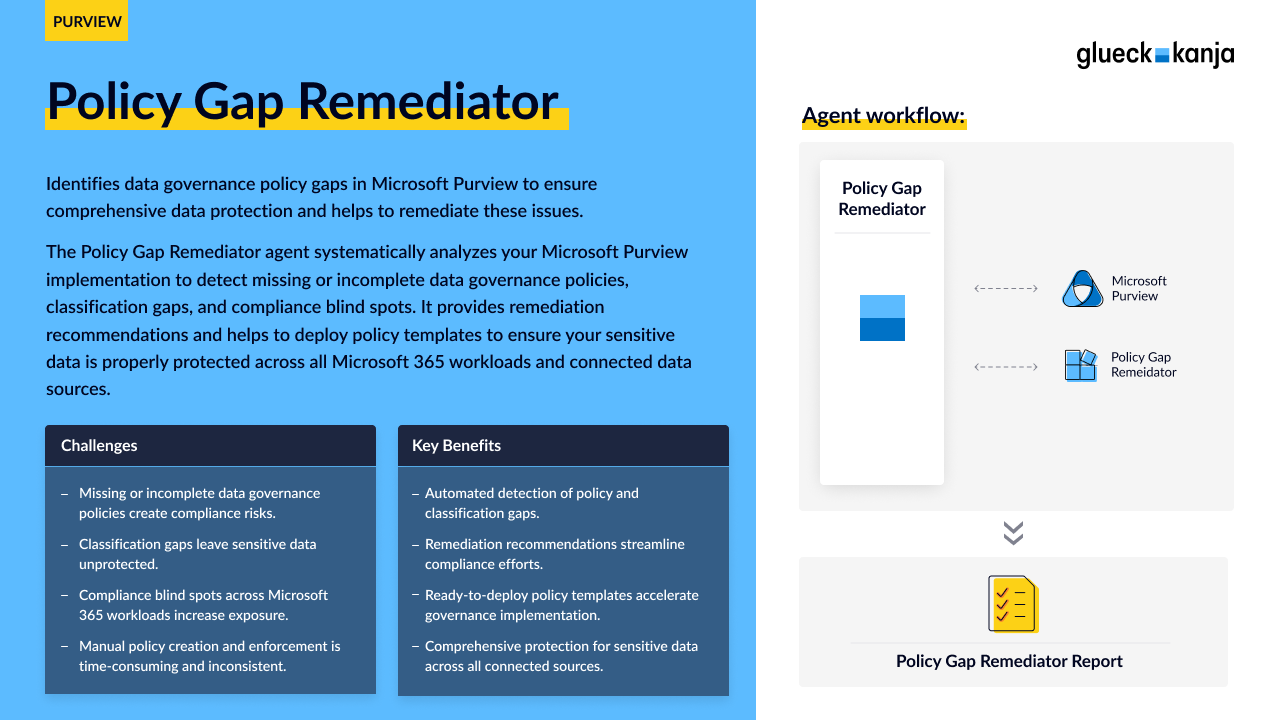
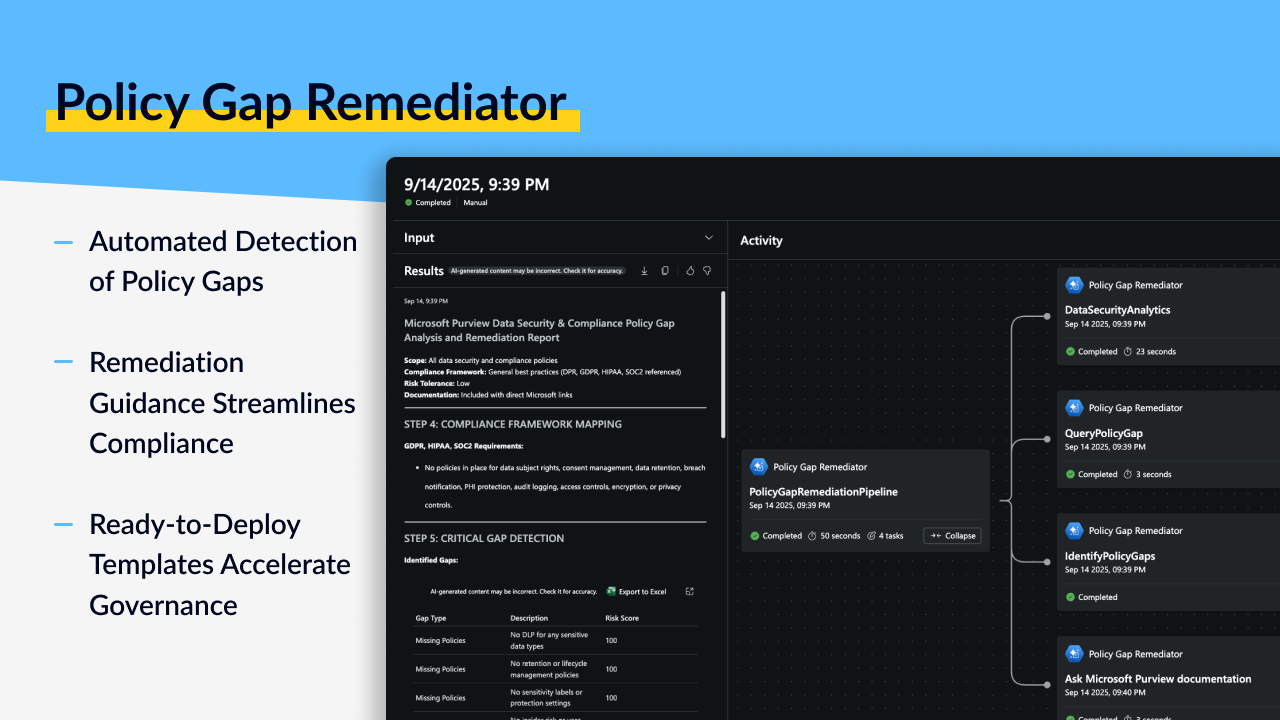
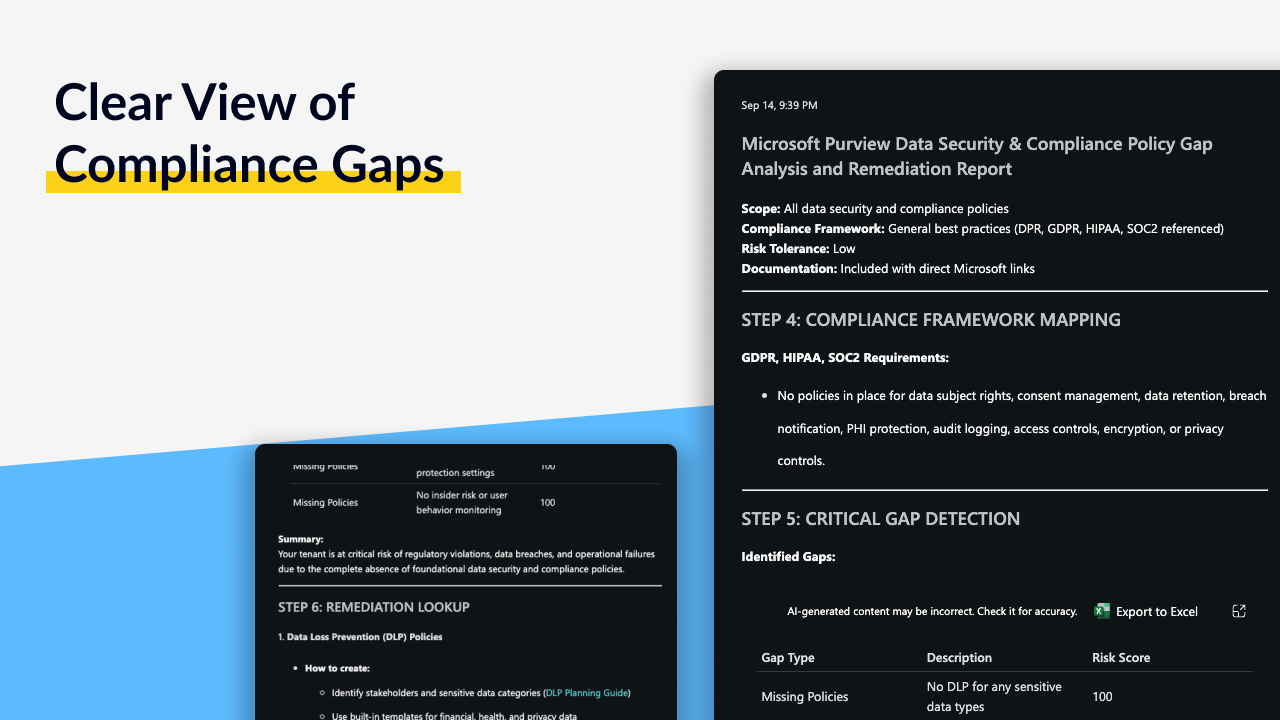
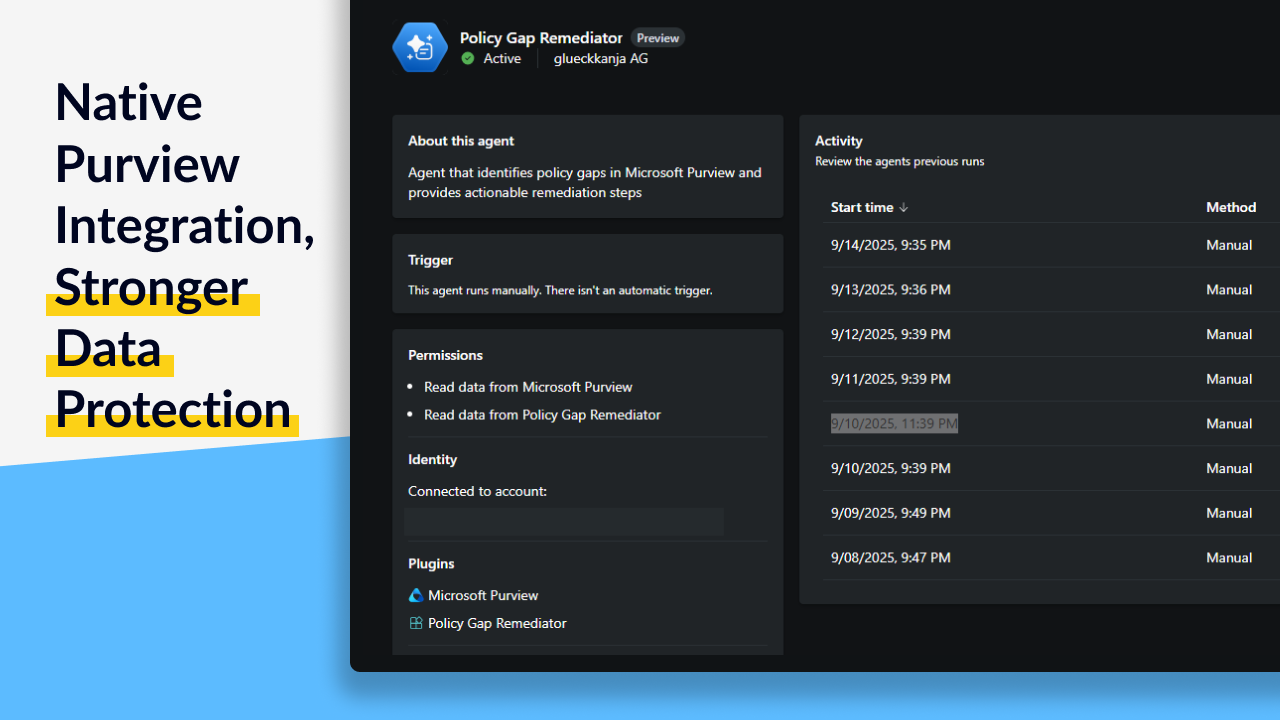
* [**Policy Gap Remediator**](/agents/policy-gap-remediator/overview) - Identifies and remediates data governance policy gaps
* [**Classification Optimizer**](/agents/classification-optimizer/overview) - Analyzes and optimizes Purview Sensitive Information Types (SITs)
#### Operations & Security
* [**Device Troubleshooter**](/agents/device-troubleshooter/overview) - Diagnoses and resolves Intune device and configuration issues
* [**Forensic Agent Core**](/agents/forensic-agent-core/overview) - Deep-dive incident analysis with threat intelligence enrichment
* [**Attack Mapping Agent**](/agents/attack-mapping-agent/overview) - MITRE ATT\&CK mappings for Microsoft Sentinel analytic rules
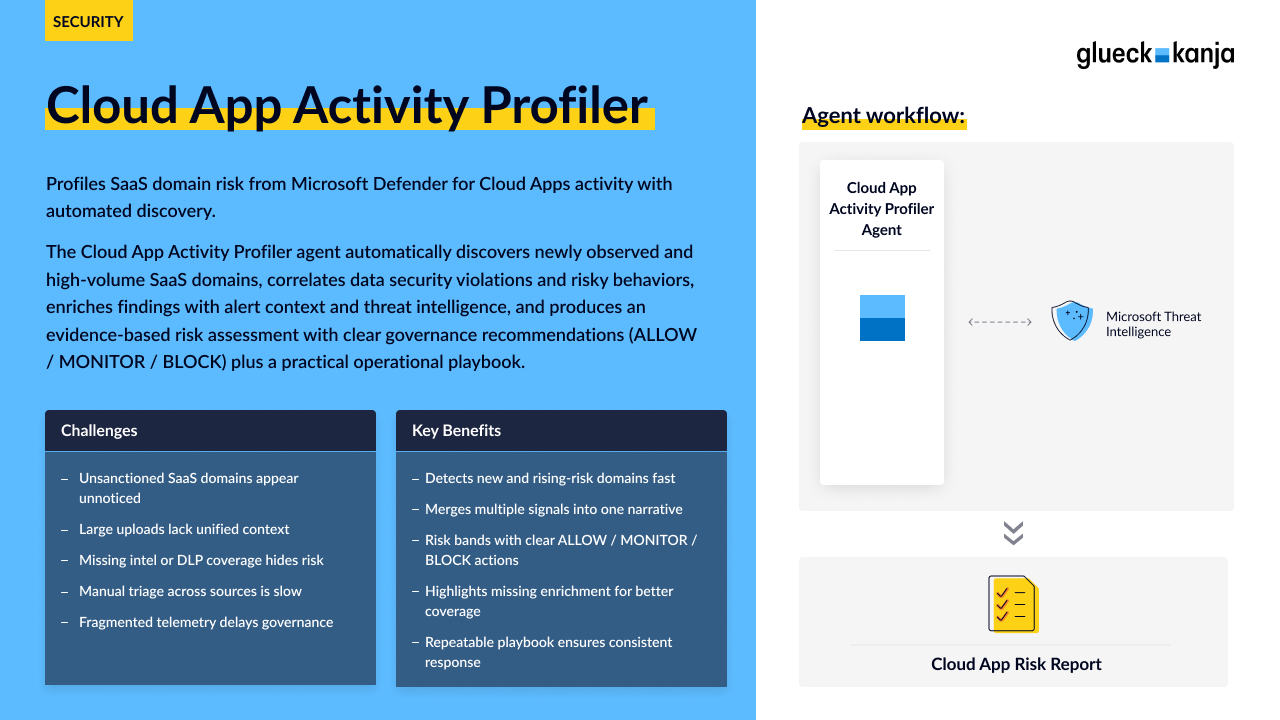
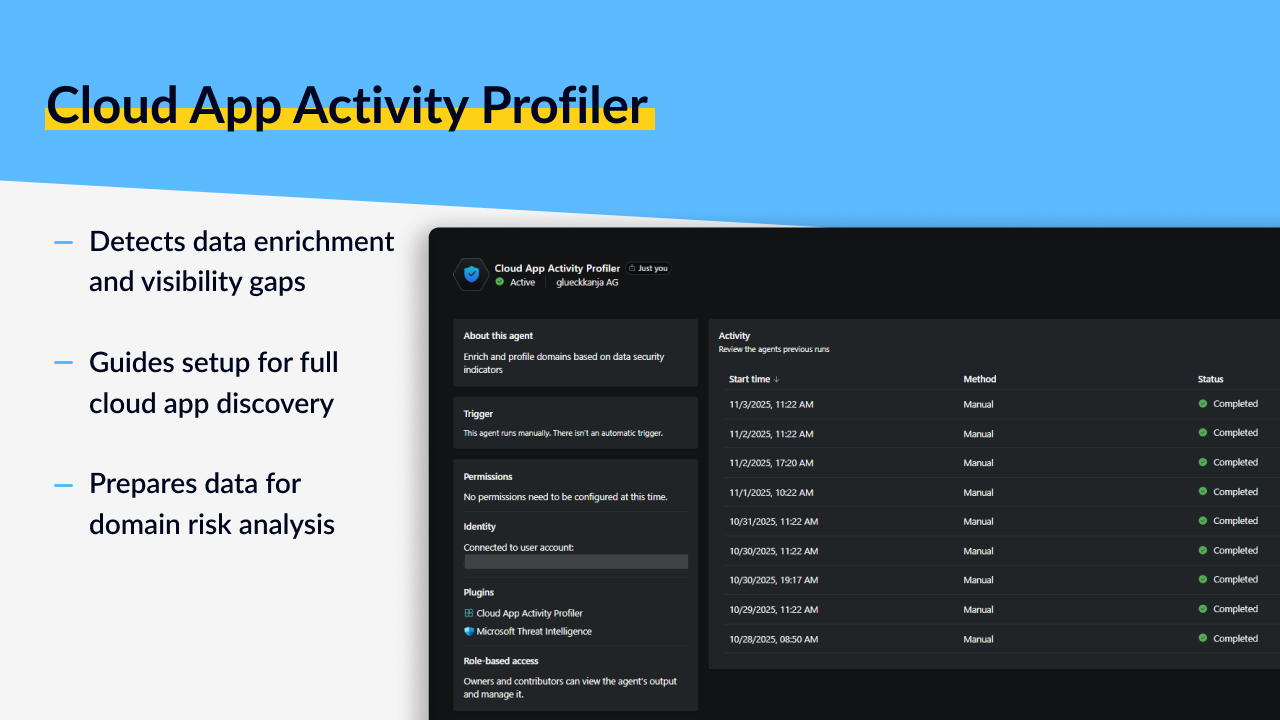
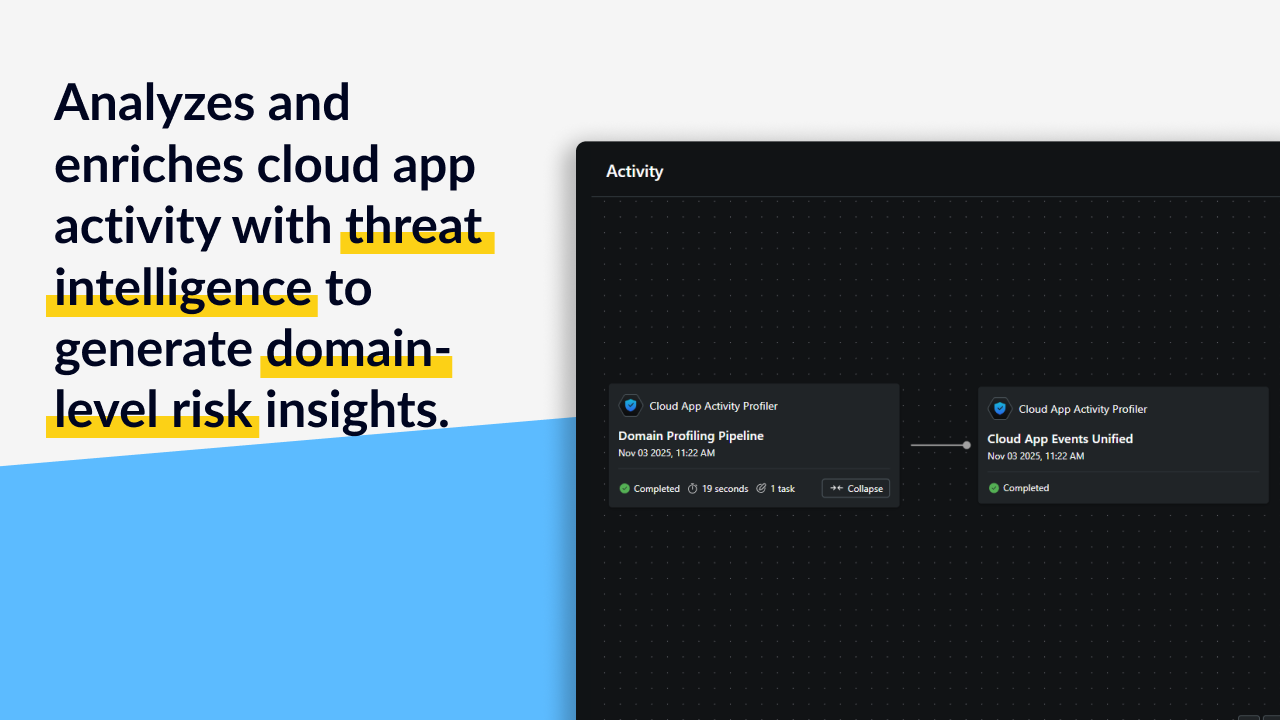
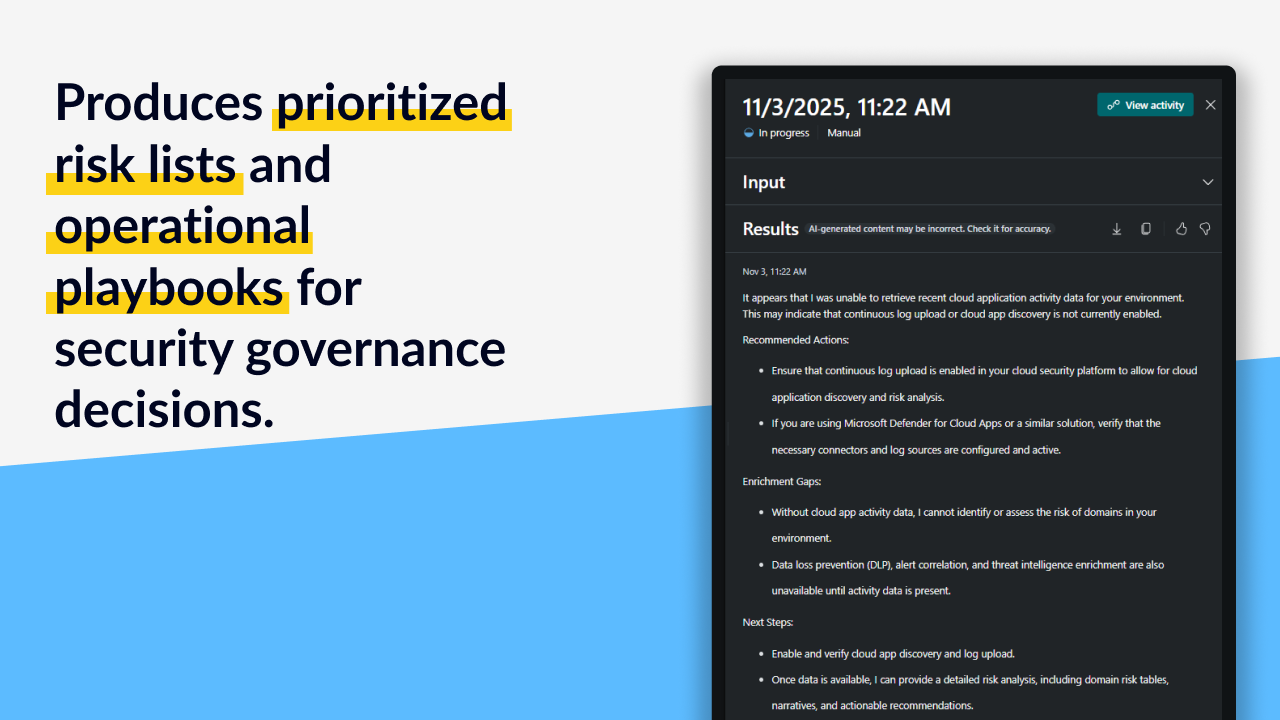
* [**Cloud App Activity Profiler**](/agents/cloud-app-activity-profiler/overview) - Profiles SaaS domain risk with automated discovery
### How to Use This Documentation
Each agent has three main documentation pages:
* **Overview** - What the agent does, use cases, and why you'd use it
* **Requirements** - Permissions needed, setup requirements, and configuration options
* **Changelog** - Version history and release notes
### Getting Started
Ready to deploy your first agent? Head to the [Get Started](/get-started) guide to learn how to set up Security Copilot Agents in your environment.
### Need Help?
Check the [Troubleshooting](/troubleshooting) section for common issues and solutions.
### About SCU Costs
Each agent includes an estimated SCU (Security Copilot Unit) cost in its overview. These are approximate costs per run and may vary based on your environment size and complexity. Plan your usage accordingly to manage costs effectively.
# Get Started
1. Navigate to the [**Microsoft Security Store**](https://securitystore.microsoft.com/agents).
2. Browse the available agents under the **Agents** section.
Select an agent (e.g., **Assignment Insights**) to view details, pricing, and requirements.
The agent overview page provides:
* A description of the solution
* Supported Microsoft services
* Requirements (such as Microsoft Entra ID)
* Pricing and licensing options
Each agent lists its available plans. For example, Assignment Insights offers:
* **Version:** 1.0.0
* **Billing term:** 1-month subscription
* **Cost:** Subscription cost per time period
When you’re ready to deploy:
1. Click **Get it now** on the agent page.
2. You’ll be redirected to the **Get Solution** wizard.
The deployment wizard consists of several steps:
* **Azure Subscription**: Select the subscription under which the agent will be deployed.
* **Resource Group**: Choose an existing group or create a new one.
* **Resource Name**: Define a unique name for the deployed solution.
* **Solution**: Pre-filled with the chosen agent (e.g., Assignment Insights).
* **Plan**: The pricing plan selected.
* **Billing Term & Frequency**: Define how often payments will occur.
* **Auto-Renewal**: Option to enable or disable automatic renewal.
After deployment:
* The agent is available in your Azure portal under the specified **Resource Group**.
* You can manage, monitor, and update it from the Security Copilot dashboard.
* Troubleshooting and additional documentation are available in the [Troubleshooting](/troubleshooting) section and in each [Agents](/agents) page.
# Troubleshooting
List of common Issues
{% hint style="info" %}
Need help or have questions regarding the agent? E-Mail us at
{% endhint %}
### Agent Won't Run
**"Insufficient privileges" or "Access denied"**
The admin account needs the required Entra ID roles. Check the specific agent's Requirements page and verify all roles are assigned. Most agents need multiple roles (e.g., Compliance Administrator + Security Reader + Reports Reader).
**"Agent not found" or "Cannot load agent"**
Make sure the agent is properly deployed to your Security Copilot environment. Redeploy the agent manifest if necessary.
### Missing or Incomplete Data
**"No data available" or "Insufficient data for analysis"**
Most agents need 30-90 days of historical data to provide meaningful insights. If you've recently deployed a service (Purview, Intune, PIM), wait for data to accumulate before running analysis.
**Agent returns partial results**
Check that all required data sources are configured and collecting data. For example:
* Purview agents need active policies and classification data
* Intune agents need enrolled devices and deployed policies
* PIM agents need role activations occurring
### Permission Problems
**"Cannot access \[service] data"**
The admin who deployed the agent needs access to the specific service. For cross-service agents, verify permissions for all services being analyzed (e.g., Purview + Defender for Compliance Assistant).
**Role assignments not working**
Permissions can take 5-15 minutes to propagate after assignment. Wait a bit and try again. If issues persist, sign out and back in to refresh tokens.
### Authentication Issues
**"Authentication failed"**
Because Entra Agent IDs aren't available yet, agents use the deploying admin's identity. Make sure:
* The admin account has all required roles
* The account hasn't been disabled or locked
* MFA/Conditional Access isn't blocking authentication
### High SCU Consumption
**Agent uses more SCUs than expected**
SCU estimates are based on typical environments. Larger tenants, longer time ranges, or more complex analyses will use more SCUs. To reduce consumption:
* Use shorter time ranges when possible
* For Classification Optimizer, use "quick" mode instead of "deep"
* Limit scope to specific areas (e.g., analyze only DLP instead of all Purview policies)
### Data Quality Issues
**Results don't match what I see in the portal**
* Reports may be delayed 24-48 hours
* The agent and portal might use different data sources or calculation methods
* Check that you're comparing the same time ranges
**Recommendations seem incorrect**
Agents make recommendations based on available data and best practices. They may not have full context about your specific business requirements. Review recommendations carefully and adjust based on your needs.
### Still Stuck?
If none of these help:
1. Check the specific agent's Requirements page for additional notes
2. Verify your Security Copilot subscription is active
3. Ensure the services being analyzed (Intune, Purview, Defender) are properly licensed and configured
4. Review the agent's changelog for known issues in your version
# Agents
# Assignment Insights
# Overview
> **SCU Cost Estimate**
>
> This agent typically consumes **0,1 - 1 SCUs** per analysis run, depending on the size of your Intune environment. Larger tenants with more policies and assignments may use more SCUs.
### Introduction
Assignment Insights helps you make sense of your Intune assignments. If you've ever wondered "which devices are actually getting this policy?" or "why are these two configurations conflicting?", this agent is for you. It analyzes your entire Intune environment (policies, apps, groups, and assignments) then shows you exactly what's working, what's overlapping, and what's missing.
### What It Does
* **Maps your assignment landscape** so you can see which policies and apps are assigned where
* **Catches conflicts early** by finding overlapping configurations before they cause problems
* **Spots the gaps** where users or devices aren't getting the policies they need
* **Checks your group targeting** to make sure assignments actually reach who you think they should
* **Suggests ways to simplify** by identifying redundant assignments and optimization opportunities
* **Shows you the impact** of changes before you make them
* **Gives you clear next steps** with remediation guidance you can actually use
### Use Cases
#### 1. Making Sure Your Security Policies Actually Work
You've configured security baselines and compliance policies, but are they actually reaching every device? Assignment Insights shows you the complete picture: which endpoints have the protection they need, and more importantly, which ones don't. No more hoping your security configurations are deployed correctly; you'll know for sure.
#### 2. Fixing Deployment Problems Fast
An app won't install. A policy isn't applying. You're clicking through dozens of assignment screens trying to figure out why. Assignment Insights does that investigation for you, finding conflicting assignments, exclusion problems, and targeting issues in seconds instead of hours. It's like having an expert troubleshooter looking over your shoulder.
#### 3. Cleaning Up Assignment Sprawl
Your Intune environment has been growing for years. Assignments pile up. Some are redundant. Some target groups that don't exist anymore. Assignment Insights helps you identify what's actually being used, what can be consolidated, and what's just creating unnecessary complexity. Finally get that environment cleanup project off your to do list.
#### 4. Planning Changes Without Breaking Things
You need to reorganize your group structure or migrate users between departments. But how will that affect your 200+ policy assignments? Assignment Insights shows you exactly what will happen before you make the change, so you can avoid accidentally leaving users without critical policies during the transition.
#### 5. Proving Compliance When It Matters
Audit season. Compliance review. Someone needs proof that required configurations are actually deployed to the right people. Assignment Insights documents your coverage, identifies any gaps that need fixing, and gives you the evidence you need, all without manually checking hundreds of assignments.
### Why Assignment Insights?
| The Problem You're Dealing With | How This Helps |
| ------------------------------------------------------------------------------------------------------------------------------------------------------ | ------------------------------------------------------------------------------------------------------------------ |
| **You can't see the big picture**: Checking assignments across hundreds of policies means endless clicking through the Intune portal | **Everything in one view**: See your entire assignment landscape analyzed and summarized |
| **Conflicts hide until they cause problems**: Two policies targeting the same devices with different settings, and you don't know until users complain | **Catches conflicts proactively**: Finds overlapping assignments and configuration clashes before deployment fails |
| **Gaps are invisible**: Some users or devices aren't getting critical policies, but you won't know unless someone reports an issue | **Shows what's missing**: Identifies exactly who's not covered by required assignments |
| **Manual reviews take forever**: You've got better things to do than manually check if assignments are correct | **Automated analysis**: Complete environment review in minutes, not days |
| **Change = risk**: Every assignment change could break something, but you can't see the downstream effects | **Know the impact first**: Understand what will happen before you click save |
| **Complexity keeps growing**: More policies, more apps, more groups, more assignments... it never simplifies itself | **Finds optimization opportunities**: Get specific recommendations for consolidating and streamlining |
### How It Works
**What goes in:**
* Your Intune policy assignments (device configs, compliance policies, security baselines, all of it)
* Application assignments and how they're deployed
* Entra ID group memberships and dynamic group rules
* Device inventory and current compliance status
* User enrollment data and any assignment filters you're using
**What it does:**
* Cross-checks assignments against actual group memberships
* Looks for overlaps, conflicts, and coverage gaps
* Evaluates whether your targeting strategy is efficient or could be simpler
* Validates that your conditional access and filter logic works the way you think it does
**What you get:**
* Coverage report showing where you have gaps
* Conflict analysis highlighting overlapping configurations
* Optimization recommendations for consolidating assignments
* Suggestions for more efficient group targeting
* Remediation scripts and clear implementation guidance
# Permissions
### Overview
This page describes the permissions and access model for this agent.\
The agent uses **read-only access** to Microsoft Intune and Microsoft Entra ID data through the **Microsoft Graph API and Security Copilot Plugins.**\
It is designed to analyze configuration settings, device assignments, and policy compliance without making any changes to your environment.
***
### How It Works
The agent connects securely to your tenant using Microsoft Graph API endpoints to retrieve Intune and Entra ID data.\
It processes this information to assess configuration health, assignment coverage, and compliance alignment.
All interactions follow these principles:
* **Read-only access:** The agent cannot modify, create, or delete configurations.
* **Least privilege:** Only the minimum permissions required to read Intune and Entra ID data are used.
* **Transparency:** All data access occurs through documented Graph API endpoints and can be audited in Microsoft Entra.
***
### Required Entra ID Roles
Assign the following roles to the administrator account that installs and runs the agent:
| Role | Description |
| -------------------- | ---------------------------------------------------------------------------------- |
| **Intune Reader** | Provides read-only access to Intune configuration, compliance, and device data. |
| **Directory Reader** | Grants read-only access to Entra ID users, groups, and directory information. |
| **Security Reader** | Enables visibility into security insights and reports without modification rights. |
{% hint style="info" %}
These roles follow the principle of least privilege. Adjust based on your organization’s security and governance policies.
{% endhint %}
***
### Data Access Transparency
The following table outlines what data the agent can access and for what purpose.
| Data Type | Access Level | Purpose |
| ---------------------------------------------- | ------------ | ----------------------------------------------------------------------------- |
| **Intune configuration profiles and policies** | Read-only | To analyze deployment configurations, compliance settings, and policy status. |
| **Device and user assignments** | Read-only | To generate insights on targeting, compliance, and configuration coverage. |
| **Entra ID directory data** | Read-only | To correlate users, groups, and device relationships for reporting. |
| **Security insights and alerts** | Read-only | To improve visibility into potential misconfigurations or compliance risks. |
**Data handling:**
* The agent does **not** modify or export customer data outside the tenant boundary.
* All data access is limited to the **Microsoft Graph API** using delegated or application permissions.
* All access activity is logged in **Microsoft Entra audit logs** for traceability and compliance.
***
### Agent Settings
The agent supports configurable parameters to adjust the scope and depth of analysis.
| Setting | Options | Description |
| --------- | ------------------------------------ | -------------------------------------------------------------------------------------------------------------------------------------------------------------------------------------------------------------------------------------------------------------------------------------------- |
| **Scope** | `devices`, `policies`, `assignments` | Determines which Intune areas are included in the analysis. |
| **Mode** | `quick`, `standard`, `deep` |
Defines analysis depth and performance trade-offs. • quick — Basic overview of configurations. • standard — Balanced analysis with most metrics (recommended). • deep — Detailed inspection with extended reporting and cross-checks.
|
{% hint style="info" %}
Ensure that all required roles are assigned to the administrator account before running the agent.
{% endhint %}
***
### Security and Compliance Considerations
* All communication with Microsoft Graph is encrypted using HTTPS and secured by Microsoft identity services.
* The agent adheres to Microsoft’s **zero trust** and **least privilege** principles.
* Access can be reviewed or revoked at any time through **Entra ID role assignments** or **application consent management**.
***
### Next Steps
* Verify that the administrator account has all required roles assigned.
* Review your organization’s least-privilege and role assignment policies.
# Changelog
### \[1.0.1] - 2025-11-03
Updated the Agent Output.
### \[1.0.0] - 2025-09-30
#### Initial Release
* Complete analysis of all your Intune policy and app assignments
* Automatic detection of gaps, overlaps, and configuration conflicts
* Group membership validation (because sometimes groups don't contain who you think they do)
* Impact assessment so you know what'll happen before you make changes
* Optimization recommendations to simplify your assignment strategy
* Clear remediation guidance with actual next steps
* Works directly in Security Copilot with natural language prompts
# Classification Optimizer
# Overview
> **SCU Cost Estimate**
>
> This agent typically consumes **0,01 - 1 SCUs** per analysis run, depending on the volume of classification data and the depth of analysis mode selected. Deep analysis mode may use more SCUs.
### Introduction
Classification Optimizer helps you get the most out of your Microsoft Purview data classification. If you've ever wondered why certain sensitive information keeps slipping through, or why you're drowning in false positives, this agent is for you. It analyzes how your Sensitive Information Types (SITs) are actually performing in the real world, finds patterns you didn't know existed, and tells you exactly how to improve your classification accuracy.
### What It Does
* **Analyzes real-world SIT performance** based on actual detection data, not just theory
* **Finds co-occurrence patterns** showing which sensitive types appear together
* **Identifies classification gaps** where important data isn't being detected
* **Spots redundant classifiers** that overlap and create unnecessary complexity
* **Recommends new composite SITs** based on patterns that consistently appear together
* **Suggests parameter tuning** to reduce false positives and improve accuracy
* **Identifies trainable classifier candidates** for complex, context-dependent patterns
* **Provides prioritized recommendations** with statistical backing (support, lift, confidence)
### Use Cases
#### 1. Reducing False Positives
Your DLP policies are firing constantly, but half the alerts aren't real issues. Users are getting frustrated with blocking that doesn't make sense. Classification Optimizer analyzes which SITs are causing problems and recommends specific parameter adjustments (confidence levels, instance counts, thresholds) to improve precision without sacrificing protection.
#### 2. Improving Detection Accuracy
Important sensitive data is getting through your policies. You suspect your classifiers aren't catching everything they should. The agent identifies coverage gaps, analyzes detection patterns, and recommends new SIT combinations or trainable classifiers to catch what you're currently missing.
#### 3. Simplifying Complex Classification Schemes
Over time, you've accumulated dozens or hundreds of SITs, and nobody knows which ones are actually valuable anymore. Classification Optimizer shows you which classifiers are redundant, which consistently appear together (and should be combined), and which aren't detecting anything useful. Finally clean up that classifier sprawl.
#### 4. Building Better Composite Classifiers
You know certain types of sensitive data tend to appear together (like passport numbers with birth dates), but creating the right composite SITs manually is guesswork. The agent analyzes co-occurrence patterns with statistical metrics, then recommends exactly which SITs should be combined and with what parameters.
#### 5. Meeting Regulatory Requirements More Effectively
Compliance frameworks require specific data protections, but your current SITs aren't aligned with those requirements. Classification Optimizer identifies strategic gaps tied to regulatory needs and recommends new classifiers or trainable classifiers to close those gaps.
### Why Classification Optimizer?
| The Problem You're Dealing With | How This Helps |
| ------------------------------------------------------------------------------------------ | ----------------------------------------------------------------------------------------------------- |
| **False positive overload**: DLP alerts everywhere, but most aren't real issues | **Precision tuning**: Specific parameter recommendations to reduce noise while maintaining protection |
| **Important data slipping through**: Your policies aren't catching everything they should | **Gap analysis**: Identifies what's being missed and recommends new detection patterns |
| **Classifier chaos**: Too many SITs, unclear which ones matter | **Usage analytics**: Shows which classifiers are actually valuable vs redundant |
| **Manual guesswork**: Building composite SITs based on intuition instead of data | **Pattern discovery**: Statistical analysis reveals which SITs consistently co-occur |
| **Time-consuming analysis**: Manually reviewing classification effectiveness takes forever | **Automated insights**: Complete analysis with prioritized recommendations in minutes |
| **No strategic direction**: Unclear where to focus classification improvement efforts | **Prioritized roadmap**: Recommendations ranked by impact with supporting metrics |
### How It Works
**What goes in:**
* Purview alert data and detection events from your specified time range (default 30 days)
* Existing SIT configurations and detection patterns
* Classification analytics and usage data
* Security events showing actual SIT detections
* SharePoint, Exchange, and file classification data
**What it does:**
* Calculates baseline metrics for each SIT (detection frequency, distribution)
* Builds a co-occurrence matrix showing which SITs appear together
* Applies statistical analysis (support, lift, conditional probability)
* Identifies patterns, gaps, and optimization opportunities
* Generates recommendations with technical justification and priority ranking
**What you get:**
* Baseline SIT performance metrics
* Co-occurrence patterns with statistical significance
* New composite SIT recommendations with suggested parameters
* Parameter tuning guidance for existing SITs
* Trainable classifier candidates for complex patterns
* Policy optimization suggestions (scoping, rule tuning, groupings)
* Prioritized action plan with expected impact
* Debug output (optional) showing detailed analysis steps
# Permissions
### Overview
This page describes the permissions, configuration requirements, and access model for this agent.\
The agent uses **read-only access** to Microsoft Purview and Microsoft Security Copilot data.\
Its purpose is to analyze data classification patterns, DLP policy activity, and security insights without modifying any configurations.
***
### How It Works
The agent connects securely to your tenant using Microsoft Graph API endpoints to read Microsoft Purview classification and DLP data.\
It analyzes these signals to identify patterns, assess coverage, and provide recommendations for improving data protection posture.
All interactions follow these principles:
* **Read-only access:** The agent does not modify or create configurations, policies, or classifiers.
* **Least privilege:** Only the minimum permissions needed to read Purview and security data are required.
* **Transparency:** All data access is through documented Graph API endpoints and is auditable in Microsoft Entra.
***
### Required Entra ID Roles
Assign the following roles to the administrator account that installs and runs the agent:
| Role | Description |
| --------------------------------- | ---------------------------------------------------------------------------------------- |
| **Compliance Data Administrator** | Provides read-only access to Microsoft Purview classification and DLP data. |
| **Security Reader** | Grants read-only visibility into security events and alerts. |
| **Global Reader** *(optional)* | Allows read-only access across Microsoft 365 services for cross-domain data correlation. |
{% hint style="info" %}
These roles follow the principle of least privilege. Adjust based on your organization’s security and compliance requirements.
{% endhint %}
***
### Data Access Transparency
The following table outlines what data the agent can access and for what purpose.
| Data Type | Access Level | Purpose |
| -------------------------------------------- | ------------ | --------------------------------------------------------------------- |
| **Purview classification and labeling data** | Read-only | To evaluate data sensitivity distribution and policy effectiveness. |
| **DLP policy match events** | Read-only | To analyze data loss trends and identify areas for improved coverage. |
| **Security insights and alerts** | Read-only | To correlate data protection events with broader security signals. |
| **Tenant configuration metadata** | Read-only | To contextualize results without making configuration changes. |
**Data handling:**
* The agent does **not** modify or export customer data outside the tenant boundary.
* All access is limited to the **Microsoft Graph API** using delegated or application permissions.
* All activity is recorded in **Microsoft Entra audit logs** for transparency and compliance verification.
***
### Agent Settings
When running the agent, the following parameters can be configured to control analysis depth and time range.
| Setting | Options | Description |
| ------------- | --------------------------------------------- | ---------------------------------------------------------------------------------------------------------------------------------------------------------------------------------------------------------------------------------------------------------------------------------------------------------------------- |
| **TimeRange** | `30`, `last_30_days`, `2025-01-01/2025-01-31` | Defines the time window for classification and DLP event analysis. |
| **Mode** | `quick`, `standard`, `deep` |
Determines analysis depth and resource usage. • quick — Fast analysis with limited recommendations. • standard — Balanced depth and performance (recommended). • deep — Comprehensive analysis with detailed statistics and extended insights (uses more SCUs).
|
{% hint style="info" %}
The agent requires **at least 30 days of classification and detection data** for meaningful results.
{% endhint %}
***
### Security and Compliance Considerations
* All communication with Microsoft Graph is encrypted using HTTPS and protected by Microsoft identity services.
* The agent aligns with Microsoft’s **zero trust** and **least privilege** principles.
* Access can be reviewed or revoked at any time through **Entra ID role assignments** or **application consent management**.
***
### Next Steps
* Verify that the administrator account has all required roles assigned.
* Confirm that Purview classification and DLP policies are active with at least 30 days of data.
# Changelog
### \[1.0.1] - 2025-11-03
Updated the Agent Output.
### \[1.0.0] - 2025-09-30
#### Initial Release
First release of Classification Optimizer! This version provides comprehensive analysis of your Purview classification effectiveness with data-driven recommendations for improvement.
**What's included:**
* SIT baseline metrics showing detection frequency and distribution
* Co-occurrence pattern analysis with statistical metrics (support, lift, conditional probability)
* New composite SIT recommendations based on real-world detection patterns
* Parameter tuning suggestions to reduce false positives and improve accuracy
* Trainable classifier candidates for complex, context-dependent patterns
* Policy optimization recommendations (scoping, grouping, rule tuning)
* Configurable analysis modes (quick, standard, deep) to balance speed vs detail
* Debug mode with detailed execution logs and skill outputs
* Integration with Security Copilot for natural language queries
# Compliance Assistant
# Overview
> **SCU Cost Estimate**
>
> This agent typically consumes **0,1-1 SCUs** per assessment run, depending on the complexity of your environment and whether additional frameworks are analyzed.
### Introduction
Compliance Assistant takes the guesswork out of compliance. If you've ever stared at a compliance framework wondering "do we actually meet these requirements?", this agent is for you. It automatically assesses your organization against the Microsoft Data Protection Baseline (DPB) and GDPR, performs technical gap analysis using real data, and gives you a clear, prioritized roadmap for closing any gaps it finds.
### What It Does
* **Automatically assesses DPB and GDPR compliance** using built-in framework knowledge
* **Performs technical gap analysis** with KQL queries that check actual vs expected state
* **Analyzes additional frameworks** when you provide requirements text or documentation URLs
* **Creates prioritized roadmaps** organized by quick wins (0-30 days), important steps (30-90 days), and strategic thoughts (90+ days)
* **Shows the evidence** with transparent sources and the actual KQL queries used
* **Recommends improvements** for enhancing your compliance posture
* **Tracks compliance trends** over time to monitor progress
### Use Cases
#### 1. Quick Compliance Health Check
You need to know where you stand on DPB and GDPR right now. Just run the agent with no parameters and you'll get a complete assessment with gap analysis and a prioritized action plan. No manual checklist review, no guessing, just data-driven results showing exactly what's compliant and what needs work.
#### 2. Pre-Audit Preparation
An audit is coming up and you need to identify gaps before the auditors do. Compliance Assistant performs the same technical checks an auditor would, gives you the findings in advance, and provides a roadmap for closing gaps. The quick wins can often be completed before the audit even starts.
#### 3. Multi-Framework Assessment
You need to comply with DPB, GDPR, and maybe ISO 27001 or SOC 2 as well. The agent assesses your baseline frameworks automatically, then you can add additional frameworks via text input or Microsoft Learn URLs. You get an integrated roadmap addressing requirements across all frameworks, not separate checklists to reconcile manually.
#### 4. Compliance Program Planning
You're building a compliance program and need to prioritize where to invest effort. The agent's roadmap shows you quick wins that deliver immediate value, important steps that address key gaps, and strategic recommendations for long-term maturity. Make decisions based on actual gap analysis, not generic best practices.
#### 5. Tracking Remediation Progress
You've started closing compliance gaps, but how do you know if you're actually improving? Run the agent regularly (monthly or quarterly) to see compliance trends over time. The gap analysis shows exactly which controls have been addressed and which still need work.
### Why Compliance Assistant?
| The Problem You're Dealing With | How This Helps |
| --------------------------------------------------------------------------------------------------------------- | ------------------------------------------------------------------------------------------------ |
| **Manual compliance checks take forever**: Reading frameworks, checking configs, comparing against requirements | **Automated assessment**: Technical gap analysis with KQL queries in minutes instead of days |
| **Compliance status is unclear**: You think you're compliant, but you're not really sure | **Evidence-based findings**: Actual data showing compliant vs non-compliant controls |
| **Generic checklists don't help**: Frameworks tell you what to do, but not what you're missing | **Gap analysis**: Specific findings showing exactly what's implemented and what isn't |
| **Overwhelming requirements**: Hundreds of controls, unclear where to start | **Prioritized roadmap**: Clear action plan with quick wins, important steps, and strategic items |
| **Multiple frameworks, one goal**: Different requirements, unclear overlaps and priorities | **Integrated assessment**: Unified roadmap addressing all frameworks together |
| **No progress visibility**: Fixing things without knowing if compliance is actually improving | **Trend tracking**: Run regularly to see compliance improvement over time |
### How It Works
**What goes in:**
* Your current environment configuration (DPB and GDPR baselines assessed automatically)
* Optional: Additional framework requirements (text or URL to Microsoft Learn docs)
* Optional: Custom time range for analysis (default 90 days)
* Compliance data, security events, audit logs, and policy configurations
**What it does:**
* Loads built-in knowledge of Data Protection Baseline and GDPR requirements
* Extends with additional frameworks if provided
* Runs KQL queries to check actual state vs expected state for each control
* Identifies gaps, deviations, and non-compliant configurations
* Generates prioritized recommendations based on impact and effort
* Organizes findings into quick wins, important steps, and strategic thoughts
**What you get:**
* Executive summary of compliance status with key findings
* Gap analysis table showing each control, status, deviation, and recommendation
* Prioritized roadmap with three time horizons (0-30 days, 30-90 days, 90+ days)
* Transparent sources showing KQL queries used and data sources consulted
* Improvement options suggesting ways to enhance compliance assessment
* Compliance trend data if running multiple assessments over time
# Permissions
### Overview
This page describes the permissions and access model for this agent.\
The agent uses **read-only access** to compliance, audit, and security data from Microsoft Defender, Microsoft Purview, and related Microsoft 365 services through the **Security Copilot Plugins**.\
Its purpose is to assess your organization's **Data Protection Baseline (DPB)** posture, identify potential compliance gaps, and generate insights without modifying any configurations.
***
### How It Works
The agent connects securely to your tenant using Microsoft Graph API endpoints to retrieve compliance, security, and audit log data.\
It evaluates this information against data protection and compliance frameworks, such as the Microsoft Data Protection Baseline and GDPR, to highlight improvement opportunities and risk areas.
All interactions follow these principles:
* **Read-only access:** The agent does not modify or create configurations, policies, or frameworks.
* **Least privilege:** Only the minimum permissions needed to read compliance and security data are required.
* **Transparency:** All data access occurs through documented Graph API endpoints and is fully auditable within Microsoft Entra.
***
### Required Entra ID Roles
Assign the following roles to the administrator account that installs and runs the agent:
| Role | Description |
| --------------------------------- | ----------------------------------------------------------------------------------- |
| **Compliance Data Administrator** | Provides read-only access to Microsoft Purview and compliance data. |
| **Security Reader** | Grants read-only visibility into Microsoft Defender security events and alerts. |
| **Report Reader** | Enables read-only access to audit and reporting data across Microsoft 365 services. |
{% hint style="info" %}
These roles are aligned with the principle of least privilege. Adjust based on your organization’s compliance and governance requirements.
{% endhint %}
***
### Data Access Transparency
The following table outlines the data accessed by the agent and its purpose.
| Data Type | Access Level | Purpose |
| -------------------------------------------- | ------------ | ------------------------------------------------------------------------------- |
| **Compliance and policy configuration data** | Read-only | To evaluate alignment with Data Protection Baseline and compliance frameworks. |
| **Security incidents and alerts** | Read-only | To correlate compliance posture with security events and risk signals. |
| **Audit logs** | Read-only | To assess user and administrative activity related to data protection controls. |
| **Data classification and labeling data** | Read-only | To identify coverage gaps in data protection and retention policies. |
**Data handling:**
* The agent does **not** modify, delete, or export customer data outside the tenant boundary.
* All access occurs through the **Microsoft Graph API** using delegated or application permissions.
* Access events are logged in **Microsoft Entra audit logs** for visibility and compliance tracking.
***
### Agent Settings
The agent supports optional parameters to customize analysis depth, frameworks, and time ranges.
| Setting | Options / Example | Description |
| --------------------------- | ------------------------------------------------------------------------------- | -------------------------------------------------------------------------------- |
| **Frameworks** | Default: Data Protection Baseline (DPB) and GDPR | Defines which compliance or protection frameworks to assess. |
| **AdditionalFrameworkText** | `"ISO 27001 requires encryption of data at rest and in transit..."` | Allows adding custom framework text for extended compliance evaluation. |
| **FrameworkURL** | `"https://learn.microsoft.com/en-us/azure/compliance/offerings/offering-soc-2"` | References an external compliance framework or guidance document for comparison. |
| **TimeRange** | `30` or `90` (days) | Defines the time window for compliance and audit data analysis. |
{% hint style="info" %}
For accurate results, ensure at least **30 days of compliance and security data** are available before running the agent.
{% endhint %}
***
### Security and Compliance Considerations
* All communication with Microsoft Graph is encrypted using HTTPS and secured through Microsoft identity services.
* The agent complies with Microsoft’s **zero trust** and **least privilege** principles.
* Access can be reviewed or revoked at any time via **Entra ID role assignments** or **application consent management**.
***
### Next Steps
* Confirm that the administrator account has the required roles assigned.
* Verify that Microsoft Defender and Purview data collection are active for at least 30 days.
* Learn more about permissions in the [Microsoft Graph permissions reference](https://learn.microsoft.com/graph/permissions-reference).
# Changelog
### \[1.2.0] - 2025-12-11
#### Current Release
This release focuses on stability, reliability, and clearer guidance when working with compliance data.
**Highlights:**
* Resolved issues that could cause query errors or incomplete results.
* Improved handling of empty, missing, or inconsistent data so the assistant can still provide useful recommendations.
* Added safeguards to prevent overly large data sets from impacting performance.
* Made time range and other input parameters more consistent and resilient.
* Aligned the assistant with the latest compliance data schemas across key data sources.
***
### \[1.1.0] - 2025-09-22
#### Previous Release
Latest version of Compliance Assistant with enhanced framework analysis and improved roadmap generation.
**What's included:**
* Automated compliance assessment for Data Protection Baseline (DPB) and GDPR
* Technical gap analysis using KQL queries to verify actual vs expected state
* Support for additional compliance frameworks via text input or Microsoft Learn URLs
* Prioritized roadmap with three time horizons (quick wins, important steps, strategic thoughts)
* Transparent evidence with sources and KQL queries shown
* Improvement recommendations for enhancing compliance posture
* Integration with Microsoft Learn documentation
* Compliance trend tracking over multiple assessment runs
* Works directly in Security Copilot with natural language prompts
### \[1.0.1] - 2025-11-03
Updated the Agent Output.
### \[1.0.0] - 2025-09-30
#### Initial Release
**What's included:**
* Automated compliance assessment for Data Protection Baseline (DPB) and GDPR
* Technical gap analysis using KQL queries to verify actual vs expected state
* Support for additional compliance frameworks via text input or Microsoft Learn URLs
* Prioritized roadmap with three time horizons (quick wins, important steps, strategic thoughts)
* Transparent evidence with sources and KQL queries shown
* Improvement recommendations for enhancing compliance posture
* Integration with Microsoft Learn documentation
* Compliance trend tracking over multiple assessment runs
* Works directly in Security Copilot with natural language prompts
# Device Troubleshooter
# Overview
> **SCU Cost Estimate**
>
> This agent typically consumes **\~0,2 SCUs** per troubleshooting session, depending on the complexity of the issue and number of devices analyzed.
### Introduction
Device Troubleshooter is your automated Intune diagnostics expert. If you've ever spent hours digging through device logs, policy assignments, and compliance reports trying to figure out why something isn't working, this agent is for you. It analyzes device configurations, detects policy conflicts, diagnoses enrollment issues, and gives you a clear root cause analysis with specific remediation steps.
### What It Does
* **Diagnoses device compliance problems** by analyzing actual device state vs policy requirements
* **Detects policy conflicts** that cause deployment failures or unexpected behavior
* **Troubleshoots enrollment issues** to identify why devices aren't enrolling successfully
* **Validates configuration profiles** and identifies misconfigurations
* **Analyzes app deployment problems** to find why applications aren't installing
* **Verifies conditional access** to understand why devices are blocked or granted access
* **Provides root cause analysis** with clear explanations of what's wrong
* **Generates remediation steps** with actionable fix instructions and scripts where applicable
### Use Cases
#### 1. Device Won't Enroll
A device keeps failing to enroll in Intune and you're not sure why. Device Troubleshooter analyzes enrollment requirements, checks prerequisites, examines error logs, and identifies exactly what's blocking enrollment (missing permissions, incorrect configuration, network issues, etc.). You get specific steps to fix it instead of guessing.
#### 2. Policy Conflicts Causing Weird Behavior
A device has conflicting policies applied and the resulting behavior is unpredictable. One policy says to allow something, another says to block it. Device Troubleshooter identifies all conflicting policies, shows which ones are actually being applied, explains the precedence rules, and recommends how to resolve the conflicts.
#### 3. Compliance Status Shows Red
A device is showing as non-compliant but you can't figure out which requirement it's failing. Device Troubleshooter analyzes all compliance policy assignments, checks the actual device state against each requirement, and pinpoints exactly which controls are failing and why.
#### 4. Apps Won't Install
An application is assigned to a device but refuses to install. Device Troubleshooter examines app deployment configuration, checks assignment targeting, validates device compatibility, analyzes installation logs, and identifies the root cause (wrong architecture, unmet dependencies, conflicting apps, etc.).
#### 5. Conditional Access Blocking Unexpectedly
A user's device is being blocked by conditional access when it shouldn't be. Device Troubleshooter analyzes conditional access policy assignments, checks device compliance status, validates authentication requirements, and shows exactly which policy condition is failing and why.
### Why Device Troubleshooter?
| The Problem You're Dealing With | How This Helps |
| ------------------------------------------------------------------------------------------------- | --------------------------------------------------------------------------------------- |
| **Manual troubleshooting takes forever**: Hours spent checking logs, policies, and configurations | **Automated diagnostics**: Complete analysis in minutes with clear findings |
| **Root cause is unclear**: You know something's wrong but not what or why | **Root cause analysis**: Specific explanation of what's failing and why it's happening |
| **Policy conflicts are hidden**: Multiple policies interact in unexpected ways | **Conflict detection**: Identifies overlapping policies and explains precedence |
| **Trial and error fixes**: Trying random solutions hoping something works | **Actionable remediation**: Specific steps to fix the actual problem |
| **Enrollment failures are cryptic**: Generic error messages that don't explain the issue | **Enrollment diagnostics**: Analyzes prerequisites and identifies exact blocking issues |
| **App deployment mysteries**: Apps fail to install with vague error codes | **Deployment analysis**: Checks configuration, compatibility, and dependencies |
### How It Works
**What goes in:**
* Device IDs or device names you want to troubleshoot
* Tenant configuration data from Intune
* Device compliance reports and current state
* Policy assignments and configuration profiles
* Error logs and audit data
* User group memberships affecting the device
* Enrollment status information
**What it does:**
* Retrieves complete device configuration and policy assignments
* Analyzes compliance status against all assigned policies
* Checks for policy conflicts and configuration issues
* Examines enrollment prerequisites and error logs
* Validates app deployment configuration and compatibility
* Reviews conditional access policy evaluation
* Identifies root causes and generates remediation plan
**What you get:**
* Diagnostic report with root cause analysis
* Policy conflict detection and resolution steps
* Compliance status summary showing which requirements are failing
* Remediation action plan with specific steps
* Fix scripts where applicable (PowerShell, Bash, etc.)
* Recommendations for preventing similar issues
* Timeline showing when issues started occurring
# Permissions
### Overview
This page describes the permissions and access model for this agent.\
The agent uses **read-only access** to Microsoft Intune and Microsoft Entra ID data through the **Microsoft Graph API**.\
It is designed to help troubleshoot device-related issues such as enrollment failures, app deployment errors, or compliance inconsistencies without modifying any configurations.
***
### How It Works
The agent connects securely to your tenant using Microsoft Graph API endpoints to gather Intune device data, configuration profiles, policy assignments, and diagnostic logs.\
It analyzes this information to identify potential causes of device management or enrollment issues and provides recommendations for remediation.
All interactions follow these principles:
* **Read-only access:** The agent does not modify, create, or delete device configurations or policies.
* **Least privilege:** Only the permissions required to read Intune device data are granted.
* **Transparency:** All data access occurs through documented Graph API endpoints and can be audited within Microsoft Entra.
***
### Required Entra ID Roles
Assign the following roles to the administrator account that installs and runs the agent:
| Role | Description |
| -------------------- | -------------------------------------------------------------------------------------------- |
| **Intune Reader** | Provides read-only access to Intune device information, configurations, and compliance data. |
| **Directory Reader** | Grants read-only access to Entra ID user and device relationships. |
| **Security Reader** | Enables access to device compliance and security alert data for diagnostic purposes. |
{% hint style="info" %}
These roles are aligned with the principle of least privilege. Adjust role assignments as needed for your organization’s governance requirements.
{% endhint %}
***
### Data Access Transparency
The following table outlines the data accessed by the agent and its purpose.
| Data Type | Access Level | Purpose |
| ----------------------------------------- | ------------ | ------------------------------------------------------------------------- |
| **Device inventory and status** | Read-only | To retrieve hardware, OS, and enrollment information for troubleshooting. |
| **Configuration and compliance policies** | Read-only | To analyze applied policies and identify misconfigurations. |
| **App deployment and installation data** | Read-only | To review app assignment, delivery status, and failure details. |
| **Diagnostic logs and error codes** | Read-only | To correlate error events and identify root causes. |
| **User and group assignments** | Read-only | To map device relationships and evaluate policy targeting. |
**Data handling:**
* The agent does **not** modify, delete, or export customer data outside the tenant boundary.
* All access is limited to the **Microsoft Graph API** using delegated or application permissions.
* All activity is recorded in **Microsoft Entra audit logs** for transparency and traceability.
***
### Agent Usage
When running the agent, provide the required input to perform troubleshooting effectively.
| Input Type | Description | Example |
| ------------ | ------------------------ | ------------------------------ |
| **Required** | Device ID or device name | `"Troubleshoot device ABC123"` |
| **Optional** | Issue description | `"App won't install"` |
| **Optional** | Error code or message | `"0x87D1041C"` |
| **Optional** | Time of issue occurrence | `"2025-01-15T09:00Z"` |
#### Example Queries
* `"Troubleshoot device ABC123"`
* `"Why won't device DESKTOP-XYZ enroll?"`
* `"Analyze compliance issues for user john.doe's laptop"`
* `"Why is app deployment failing on device DEV456?"`
{% hint style="info" %}
Ensure that the administrator account running the agent has all required roles assigned before use.
{% endhint %}
***
### Security and Compliance Considerations
* All communication with Microsoft Graph is encrypted using HTTPS and secured by Microsoft identity services.
* The agent adheres to Microsoft’s **zero trust** and **least privilege** principles.
* Access can be reviewed or revoked at any time through **Entra ID role assignments** or **application consent management**.
***
### Next Steps
* Verify that the administrator account has all required roles assigned.
* Review Intune device compliance and enrollment data to ensure proper visibility before troubleshooting.
# Changelog
### \[1.0.1] - 2025-11-03
Updated the Agent Output.
### \[1.0.0] - 2025-09-30
#### Initial Release
First release of Device Troubleshooter! This version provides comprehensive diagnostics for Microsoft Intune device and configuration issues.
**What's included:**
* Automated device compliance analysis with detailed status reporting
* Policy conflict detection showing overlapping configurations and precedence
* Enrollment troubleshooting with root cause identification
* Configuration profile validation to detect misconfigurations
* Application deployment diagnostics for install failures
* Conditional access verification showing policy evaluation results
* Root cause analysis with clear explanations
* Remediation action plans with specific fix steps
* Fix scripts where applicable (PowerShell, Bash)
* Integration with Security Copilot for natural language troubleshooting
# Forensic Agent Core
# Overview
> **SCU Cost Estimate**
>
> This agent typically consumes **0,2-3 SCUs** per incident analysis, depending on incident complexity, number of entities involved, and depth of threat intelligence enrichment.
### Introduction
Forensic Agent Core is your automated incident analyst. If you've ever looked at a Defender XDR incident and thought "I need the full story, not just scattered alerts", this agent is for you. It takes an incident ID, pulls together everything related, enriches it with threat intelligence, builds a minute-by-minute timeline, and delivers a comprehensive forensic report that would normally take hours of manual investigation.
### What It Does
* **Reconstructs incident timelines** minute by minute from scattered alerts and events
* **Extracts and maps entities** (devices, users, IPs, domains, files, hashes) and their relationships
* **Enriches with threat intelligence** using multiple sources (Shodan, SSL certs, WHOIS, CIRCL, reputation services)
* **Analyzes device security posture** showing vulnerabilities, software, and configuration
* **Tracks identity activity** with risk events and authentication patterns
* **Correlates analyst comments** to provide investigation context
* **Classifies incidents** as True Positive, False Positive, or needs escalation with malicious intent scoring
* **Recommends remediation** with prioritized, actionable steps
* **Generates standardized reports** ready for handoffs, audits, or escalation
### Use Cases
#### 1. Incident Triage and Initial Assessment
You have a new high-severity incident and need to quickly understand what happened. Forensic Agent Core analyzes the incident, builds a timeline, identifies key entities, and provides a classification (True/False Positive) with confidence scoring. Instead of spending 30-60 minutes gathering context, you get a complete picture in minutes.
#### 2. Preparing Incident Reports for Management
Leadership wants a clear explanation of a security incident. The agent generates a comprehensive forensic report with an executive summary, timeline, entity map, threat intel findings, and remediation recommendations. Everything is standardized and ready to present, no manual report writing needed.
#### 3. Threat Intelligence Enrichment
An incident involves external IPs and domains, but you don't know if they're malicious. Forensic Agent Core enriches all indicators with open-source and commercial threat intelligence (Shodan port scans, SSL certificate analysis, WHOIS data, malware associations, reputation scores). You get curated intel that highlights what actually matters.
#### 4. Deep-Dive Forensic Analysis
A critical incident requires detailed investigation before response. The agent performs advanced hunting queries, extracts all related entities, analyzes device and identity posture, correlates events into a precise timeline, and provides forensic-level detail about what happened, when, and how. Save hours of manual correlation work.
#### 5. SOC Team Handoffs and Escalations
You need to escalate an incident to Tier 2 or external forensics team. The agent's standardized report provides complete context, timeline, entity relationships, threat intel, and initial analysis. The receiving team can pick up immediately without asking for clarification or redoing research.
### Why Forensic Agent Core?
| The Problem You're Dealing With | How This Helps |
| ----------------------------------------------------------------------------------------------- | ------------------------------------------------------------------------------------------ |
| **Fragmented alerts everywhere**: Incident has dozens of alerts, unclear how they relate | **Complete timeline**: Minute-by-minute reconstruction showing how events connect |
| **Missing context**: Alerts show what happened but not why or what it means | **Entity mapping**: Full picture of devices, users, IPs, domains, and their relationships |
| **Manual threat intel lookups**: Copying indicators into multiple tools takes forever | **Automated enrichment**: All indicators enriched with curated intel from multiple sources |
| **Device and identity data disconnected**: Can't see how user activity relates to device events | **Integrated analysis**: Device posture and identity activity correlated in one view |
| **Time pressure for reports**: Management wants detailed analysis but you have 30 minutes | **Ready-made reports**: Comprehensive forensic report generated automatically |
| **Noisy intel feeds**: Too much information, unclear what's actually important | **Curated findings**: Agent highlights what matters, filters out noise |
### How It Works
**What goes in:**
* Incident ID from Microsoft Defender XDR
* Associated alerts, entities, and evidence
* Analyst comments and investigation notes
* Device and user activity data
* Threat intelligence feeds (Shodan, CIRCL, reputation services)
**What it does:**
* Retrieves complete incident data including all alerts and entities
* Performs advanced hunting queries to find related activity
* Extracts all entities (devices, users, IPs, domains, files, hashes)
* Builds entity relationship map
* Reconstructs minute-by-minute timeline from events
* Enriches external indicators with threat intelligence
* Analyzes device security posture (vulnerabilities, software, config)
* Tracks identity activity and risk events
* Correlates analyst comments with timeline
* Classifies incident with malicious intent scoring
* Generates prioritized remediation recommendations
**What you get:**
* Executive summary with key findings and classification
* Minute-by-minute timeline of incident progression
* Entity inventory with relationships (who, what, where, when)
* Device security posture summary (vulnerabilities, software, security controls)
* Identity activity summary (authentication, risk events, behavior)
* Threat intelligence findings:
* Open ports/services/vulnerabilities (Shodan)
* SSL certificate metadata and validation
* WHOIS registration data
* Malware associations and file reputation (CIRCL)
* IP/domain reputation scores
* Incident classification (True Positive, False Positive, Escalate)
* Malicious intent confidence score
* Prioritized remediation recommendations with specific actions
# Permissions
### Overview
This page describes the permissions and access model for this agent.\
The agent uses **read-only access** to security incident, alert, device, and identity risk data through **Security Copilot Plugins**.\
It is designed to assist with forensic and threat investigations in Microsoft Defender XDR by analyzing incidents, correlating context, and enriching results with external intelligence sources.
***
### How It Works
The agent connects securely to your Microsoft Defender XDR environment through Security Copilot Plugins to collect incident details, alerts, advanced hunting results, and related entity data.\
It then enriches these findings with external threat intelligence to generate a unified investigation view.
All interactions follow these principles:
* **Read-only access:** The agent does not modify, resolve, or delete incidents or alerts.
* **Least privilege:** Only the roles necessary to read incident and threat data are required.
* **Transparency:** All data access is auditable in Microsoft Entra and follows standard security and compliance controls.
***
### Required Entra ID Roles
Assign the following roles to the administrator account that installs and runs the agent:
| Role | Description |
| ------------------- | ----------------------------------------------------------------------------------------------- |
| **Security Reader** | Provides read-only access to Defender XDR incidents, alerts, and investigation data. |
| **Global Reader** | Grants read-only access across Microsoft 365 services for correlation and cross-domain context. |
#### Optional Roles for Enhanced Analysis
| Role | Description |
| -------------------------- | --------------------------------------------------------------------------------------------- |
| **Security Administrator** | Allows execution of advanced hunting queries and deeper data correlation within Defender XDR. |
{% hint style="info" %}
Assigning **Security Administrator** enables advanced hunting capabilities but is not required for standard analysis.
{% endhint %}
***
### Data Access Transparency
The following table outlines what data the agent can access and for what purpose.
| Data Type | Access Level | Purpose |
| ------------------------------------------- | ------------ | ------------------------------------------------------------------------------------ |
| **Security incidents and alerts** | Read-only | To investigate and correlate alerts, identify root causes, and assess impact. |
| **Advanced hunting data** | Read-only | To perform pattern and behavior analysis across entities and telemetry. |
| **Device and endpoint data** | Read-only | To link alerts to devices, processes, and network activity. |
| **Identity risk data** | Read-only | To analyze user behavior and correlate incidents with potential identity compromise. |
| **External threat intelligence indicators** | Read-only | To enrich alerts and entities with contextual risk information. |
**Data handling:**
* The agent does **not** modify or export customer data outside the tenant boundary.
* All access is limited to **Security Copilot Plugins** using delegated or application-level permissions.
* Access activity is logged in **Microsoft Entra audit logs** for compliance and traceability.
***
### Agent Usage
When running the agent, provide the required input to analyze incidents or generate investigation summaries.
| Input Type | Description | Example |
| ------------ | --------------------------------- | -------------------------------------------------- |
| **Required** | Incident ID | `"Analyze incident 12345"` |
| **Optional** | Additional parameters for context | `"Generate forensic report for incident ID 67890"` |
| **Optional** | Deep-dive or summary mode | `"Deep dive into incident 45678"` |
Incident IDs can be found in the **Microsoft 365 Defender portal** under:\
**Incidents & alerts → Incidents.**
***
### External Threat Intelligence Services
The agent automatically enriches indicators using the following external services — no configuration or API keys are required:
| Service | Purpose |
| --------------------------------- | --------------------------------------------------------------- |
| **Shodan** | Port scanning, service detection, and vulnerability discovery. |
| **SSL/TLS Analysis** | Certificate metadata inspection and validation. |
| **WHOIS Services** | Domain registration and ownership lookup. |
| **CIRCL** | Malware hash lookups and file reputation checks. |
| **IP/Domain Reputation Services** | Scoring and contextual risk evaluation for external indicators. |
These services are queried automatically as part of each analysis to enhance detection context and improve investigative accuracy.
***
### Security and Compliance Considerations
* All communication through Security Copilot Plugins is encrypted using HTTPS and authenticated via Microsoft identity services.
* The agent adheres to Microsoft’s **zero trust** and **least privilege** principles.
* Access can be reviewed or revoked at any time through **Entra ID role assignments** or **application consent management**.
***
### Next Steps
* Verify that the administrator account has the required roles assigned.
* Ensure Defender XDR and related telemetry sources are active and contain recent incident data.
* Review the investigation results within Security Copilot for contextual recommendations.
# Changelog
### \[1.0.1] - 2025-11-03
Updated the Agent Output.
### \[1.0.0] - 2025-09-30
#### Initial Release
First release of Forensic Agent Core! This version provides comprehensive incident analysis and forensic reporting for Microsoft Defender XDR incidents.
**What's included:**
* Minute-by-minute incident timeline reconstruction
* Entity extraction and relationship mapping (devices, users, IPs, domains, files, hashes)
* Threat intelligence enrichment from multiple sources:
* Shodan (port scans, services, vulnerabilities)
* SSL/TLS certificate analysis
* WHOIS registration data
* CIRCL malware hash lookups
* IP/domain reputation services
* Device security posture analysis (vulnerabilities, software inventory, security controls)
* Identity activity tracking with risk events and authentication patterns
* Analyst comment correlation for investigation context
* Incident classification (True Positive, False Positive, Escalate)
* Malicious intent confidence scoring
* Prioritized remediation recommendations
* Standardized forensic reports ready for handoffs, audits, and escalations
* Integration with Security Copilot for natural language incident analysis
# License Optimizer
# Overview
> **SCU Cost Estimate**
>
> This agent typically consumes **1-3 SCUs** per optimization analysis, depending on the size of your user base and number of license SKUs being analyzed.
### Introduction
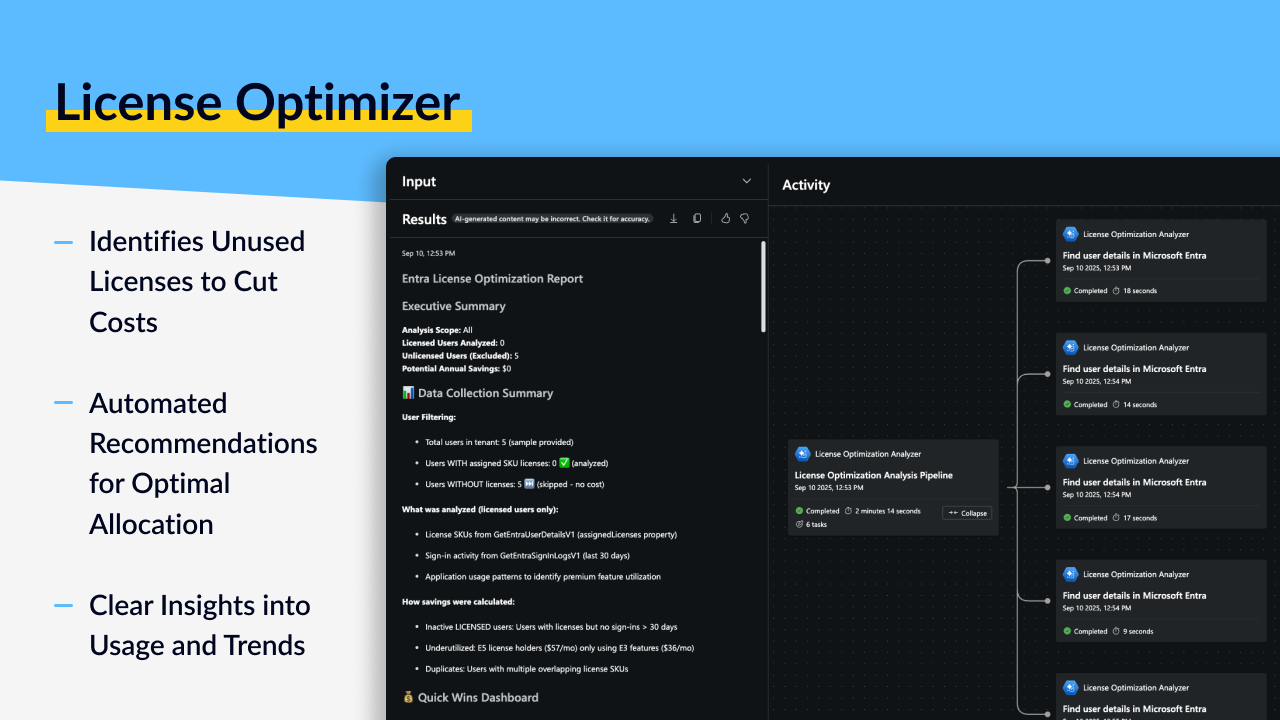
License Optimizer helps you stop wasting money on unused licenses. If you've ever wondered how many of your Microsoft 365 licenses are actually being used, or whether users really need all the features they're assigned, this agent is for you. It analyzes actual usage patterns, identifies underutilized licenses, recommends optimal assignments, and shows you exactly where you can cut costs without impacting user productivity.
### What It Does
* **Analyzes license utilization** across all Microsoft 365 and Azure licenses
* **Identifies unused licenses** assigned to inactive users or never used
* **Tracks feature usage** to see which service plans are actually being consumed
* **Recommends optimal assignments** based on real usage patterns
* **Detects duplicate licenses** where users have overlapping service plans
* **Finds inactive users** who are consuming licenses but not using services
* **Projects license needs** with forecast modeling for future planning
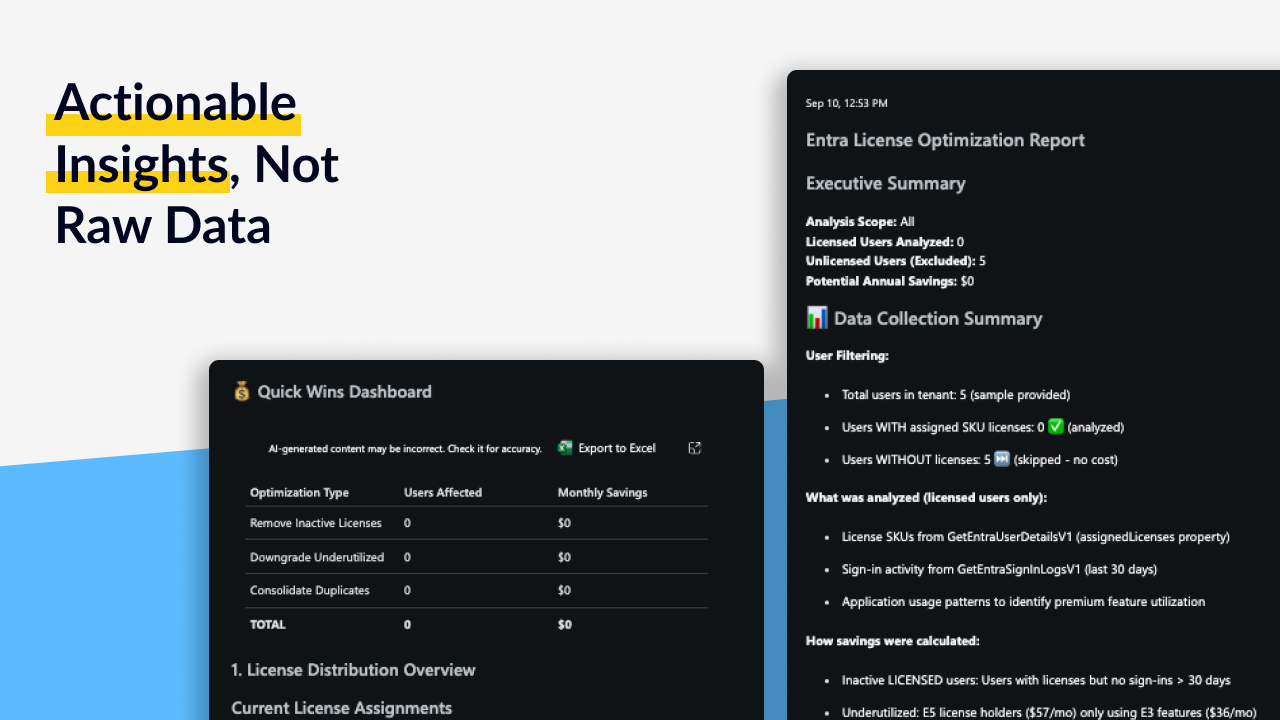
* **Calculates cost savings** showing exactly how much you can save
* **Provides reassignment plans** with specific actions to optimize allocation
### Use Cases
#### 1. Reducing License Spend
You're paying for hundreds or thousands of licenses but suspect many aren't being used. License Optimizer analyzes actual usage data, identifies licenses assigned to inactive users, finds underutilized premium licenses, and shows you exactly which licenses can be removed or downgraded. Get specific cost savings recommendations with dollar amounts.
#### 2. Right-Sizing License Assignments
Users have E5 licenses but only use features available in E3. License Optimizer tracks which service plans are actually being consumed, compares against license tiers, and recommends downgrading users to cheaper SKUs when they don't need premium features. Save money without affecting productivity.
#### 3. Cleaning Up After Departures
Employees have left but their licenses are still assigned. License Optimizer identifies inactive users based on sign-in patterns and service usage, then provides a list of licenses that can be immediately reclaimed. Stop paying for accounts that aren't being used.
#### 4. Eliminating License Duplication
Users have multiple licenses with overlapping service plans (like having both E3 and E5, or redundant add-ons). License Optimizer detects these duplications and recommends consolidation to eliminate unnecessary spending.
#### 5. License Forecasting and Budgeting
You're planning next year's budget and need to project license costs. The agent analyzes usage trends, user growth patterns, and consumption rates to forecast future license needs. Make informed budget decisions based on actual data, not guesswork.
### Why License Optimizer?
| The Problem You're Dealing With | How This Helps |
| -------------------------------------------------------------------------------------------------------------- | ---------------------------------------------------------------------------------------------------- |
| **No visibility into actual usage**: You know how many licenses you bought, but not how many are actually used | **Usage analytics**: See exactly which licenses are being used and which are sitting idle |
| **Overprovisioned premium licenses**: Users have expensive licenses but only use basic features | **Right-sizing recommendations**: Identify who can be downgraded without losing needed functionality |
| **Inactive accounts consuming licenses**: Former employees or inactive users still have licenses assigned | **Inactive user detection**: Find accounts that aren't signing in or using services |
| **Complex licensing models**: Too many SKUs, unclear which users need what | **Optimal assignment guidance**: Recommendations based on actual usage patterns |
| **Duplicate licenses wasting money**: Users with overlapping service plans from multiple licenses | **Duplication detection**: Identify and eliminate redundant license assignments |
| **Budget planning guesswork**: Unclear how many licenses you'll need next year | **Forecasting**: Project future needs based on trends and growth patterns |
### How It Works
**What goes in:**
* User license assignments from Entra ID
* Microsoft 365 usage reports (email, Teams, SharePoint, OneDrive, etc.)
* User activity logs and sign-in patterns
* Service plan consumption data
* Application usage metrics
* License SKU information and pricing
* Billing and cost data (if available)
**What it does:**
* Analyzes which licenses are assigned to each user
* Tracks actual usage of each service plan
* Identifies sign-in patterns and activity levels
* Compares assigned features vs used features
* Detects duplicate or overlapping service plans
* Calculates utilization rates and cost per user
* Forecasts future license needs based on trends
* Generates optimization recommendations with cost impact
**What you get:**
* License optimization report with utilization rates
* Cost savings recommendations with dollar amounts
* Underutilized license inventory (who has what they're not using)
* Reassignment action plan (specific users to downgrade or remove)
* Inactive user list with last sign-in dates
* Duplicate license detection with consolidation recommendations
* Usage trend analysis showing consumption patterns over time
* License forecast projections for budget planning
* Compliance status summary ensuring proper assignment policies
# Permissions
### Overview
This page describes the permissions and access model for this agent.\
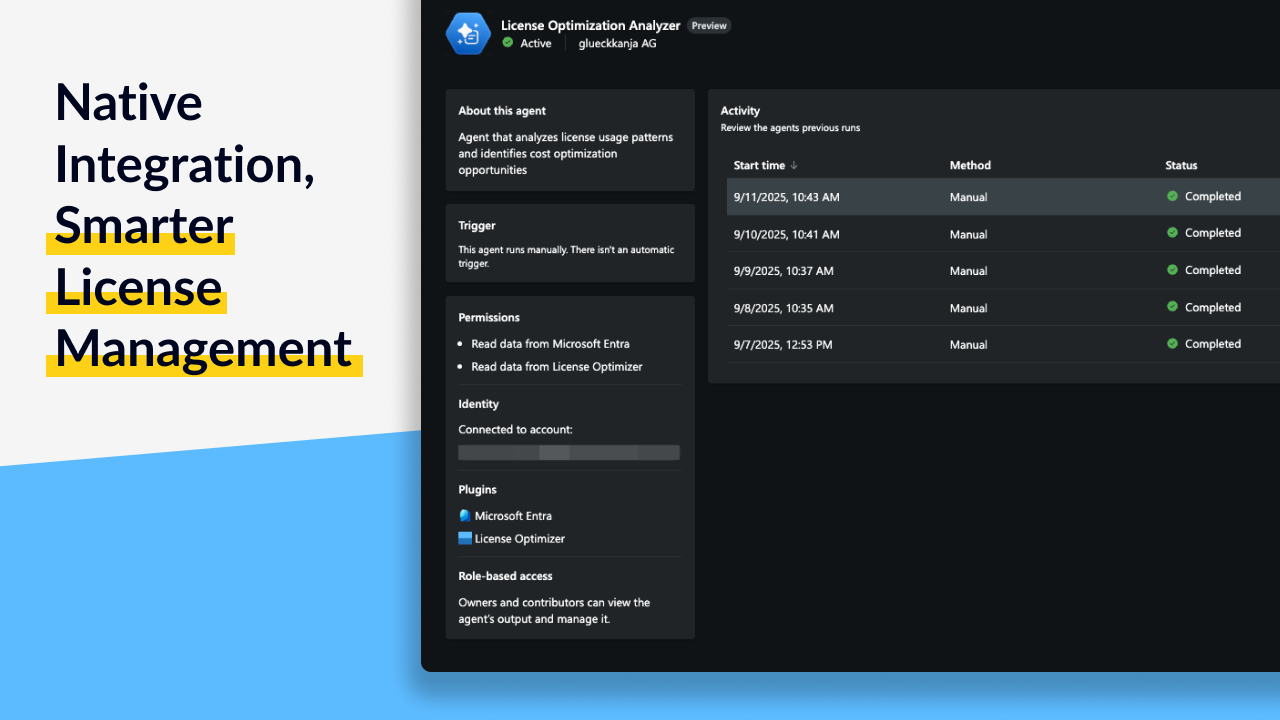
The agent uses **read-only access** to Microsoft 365 license, usage, and billing data through **Security Copilot Plugins**.\
It is designed to help organizations identify unused licenses, detect optimization opportunities, and forecast future license requirements — without modifying any license assignments or configurations.
***
### How It Works
The agent connects securely to your tenant through Security Copilot Plugins to read license assignments, usage reports, and user activity data.\
It analyzes these data sources to generate insights into license utilization, cost efficiency, and optimization potential across Microsoft 365 services.
All interactions follow these principles:
* **Read-only access:** The agent cannot modify, assign, or remove licenses.
* **Least privilege:** Only the roles required to read license, usage, and report data are necessary.
* **Transparency:** All access is auditable within Microsoft Entra and follows Microsoft compliance and security standards.
***
### Required Entra ID Roles
Assign the following roles to the administrator account that installs and runs the agent:
| Role | Description |
| ------------------------- | ----------------------------------------------------------------------- |
| **License Administrator** | Provides access to license data and assignment information. |
| **Reports Reader** | Grants access to Microsoft 365 usage and analytics reports. |
| **Global Reader** | Allows read-only visibility across services for comprehensive analysis. |
#### Optional Roles for Enhanced Analysis
| Role | Description |
| ---------------------- | ----------------------------------------------------------------------------------------------------- |
| **User Administrator** | Enables visibility into user-level license assignments and account attributes for deeper correlation. |
{% hint style="info" %}
These roles are aligned with the principle of least privilege. Adjust based on your organization’s compliance and reporting requirements.
{% endhint %}
***
### Data Access Transparency
The following table outlines what data the agent can access and its purpose.
| Data Type | Access Level | Purpose |
| ------------------------------------ | ------------ | --------------------------------------------------------------------- |
| **License assignments and SKU data** | Read-only | To identify unused or underutilized licenses across users and groups. |
| **Usage reports** | Read-only | To assess active service usage and consumption trends over time. |
| **Billing and subscription data** | Read-only | To correlate license utilization with cost and subscription terms. |
| **Audit logs and user activity** | Read-only | To confirm active usage and detect inactive or low-activity accounts. |
**Data handling:**
* The agent does **not** modify or export customer data outside the tenant boundary.
* All access occurs through **Security Copilot Plugins** using delegated or application-level permissions.
* Access activity is logged in **Microsoft Entra audit logs** for full traceability.
***
### Agent Usage
When running the agent, you can request specific analyses or allow it to automatically assess all available data.
#### Example Queries
* `"Analyze my license utilization"`
* `"Find unused Microsoft 365 licenses"`
* `"Show me cost savings opportunities"`
* `"Which users can be downgraded from E5 to E3?"`
* `"Identify inactive users consuming licenses"`
* `"Forecast my license needs for next year"`
The agent automatically reviews all licenses and user data unless a specific SKU or group is defined.
***
### Data Requirements
To ensure accurate results, verify that:
* Usage reporting is enabled in the **Microsoft 365 admin center**.
* At least **30 to 90 days of usage data** is available.
* License assignments are current in **Microsoft Entra ID**.
* User activity (sign-ins, service usage) is being tracked consistently.
***
### Security and Compliance Considerations
* All communication through Security Copilot Plugins is encrypted using HTTPS and authenticated via Microsoft identity services.
* The agent adheres to Microsoft’s **zero trust** and **least privilege** principles.
* Access can be reviewed or revoked at any time through **Entra ID role assignments** or **application consent management**.
***
### Next Steps
* Confirm that the administrator account has all required roles assigned.
* Review the agent’s analysis results in Security Copilot to identify optimization recommendations and cost-saving opportunities.
# Changelog
### \[1.0.1] - 2025-11-03
Updated the Agent Output.
### \[1.0.0] - 2025-09-30
#### Initial Release
First release of License Optimizer! This version provides comprehensive analysis of Microsoft 365 and Azure license utilization with actionable cost-saving recommendations.
**What's included:**
* License utilization analysis across all Microsoft 365 and Azure licenses
* Unused license identification (inactive users, never-used licenses)
* Feature usage tracking to see which service plans are actually consumed
* Optimal assignment recommendations based on real usage patterns
* Duplicate license detection for overlapping service plans
* Inactive user identification with sign-in pattern analysis
* Cost savings calculations with dollar amounts
* Reassignment action plans with specific users and recommended changes
* License forecast modeling for budget planning
* Usage trend analysis over time
* Compliance status verification
* Integration with Security Copilot for natural language license queries
# PIM Insights
# Overview
> **SCU Cost Estimate**
>
> This agent typically consumes **\~0,3 SCUs** per analysis run, depending on the time window analyzed and volume of PIM activations in your environment.
### Introduction
PIM Insights gives you complete visibility into privileged access in your organization. If you've ever needed to answer "who activated Global Administrator this week?" or "are there failed PIM activation attempts that could be attacks?", this agent is for you. It analyzes all PIM role activations, reconstructs detailed timelines of privileged access, identifies anomalies and failed attempts, and provides security risk assessment with actionable recommendations.
### What It Does
* **Reconstructs Global Administrator timelines** minute by minute showing who accessed when and why
* **Analyzes failed PIM activations** to identify potential attacks or unauthorized access attempts
* **Tracks all role activations** with comprehensive usage statistics
* **Validates activation reasons** for compliance with justification requirements
* **Detects anomalies** in privileged access patterns (unusual times, locations, frequency)
* **Correlates identity risk data** showing risky users who have privileged access
* **Analyzes sign-in patterns** before and after role activations
* **Provides risk assessment** with severity scoring and prioritized recommendations
* **Generates Azure Workbooks** for ongoing PIM monitoring (optional)
* **Creates compliance reports** ready for audit review
### Use Cases
#### 1. Global Administrator Access Audit
You need to know who has been using Global Administrator privileges and why. PIM Insights reconstructs a complete timeline of all Global Admin activations with exact timestamps, user identities, activation reasons, and session durations. Perfect for compliance audits, security reviews, or investigating suspicious activity.
#### 2. Detecting Unauthorized Access Attempts
Someone is trying to activate privileged roles without proper authorization. PIM Insights analyzes all failed activation attempts, correlates with user behavior and identity risk, and highlights potential attack indicators (brute force attempts, risky users trying to elevate, suspicious patterns). Catch threats before they succeed.
#### 3. PIM Compliance Reporting
Your security or compliance team needs a report on privileged access for the quarter. The agent generates a comprehensive report showing all activations, validates that users provided proper justifications, identifies any compliance violations (activations without reasons, excessive durations, etc.), and summarizes role usage statistics.
#### 4. Anomaly Detection in Privileged Access
You want to know if privileged access patterns are unusual. PIM Insights detects anomalies like activations at odd hours, from unusual locations, by users who rarely use privileges, or with abnormal frequency. Get alerts about suspicious behavior patterns that might indicate compromised accounts.
#### 5. Ongoing PIM Monitoring
You need continuous visibility into privileged access, not just one-time reports. The agent can generate Azure Workbook configurations that you deploy for real-time PIM monitoring dashboards. Track activation trends, failed attempts, and compliance metrics over time.
### Why PIM Insights?
| The Problem You're Dealing With | How This Helps |
| -------------------------------------------------------------------------------------------------------- | ----------------------------------------------------------------------------------------------- |
| **Global Admin access is invisible**: No easy way to see who's been using the most powerful role | **Complete timelines**: Minute-by-minute reconstruction of all Global Administrator activations |
| **Failed attempts go unnoticed**: Potential attacks hidden in audit logs | **Failed activation analysis**: All failed attempts highlighted with risk assessment |
| **Compliance is manual work**: Auditors want privileged access reports and you're manually building them | **Ready-made reports**: Comprehensive compliance documentation automatically generated |
| **Anomalies are hard to spot**: Unusual privileged access patterns get lost in the noise | **Anomaly detection**: Automated identification of suspicious activation patterns |
| **No ongoing visibility**: You can pull logs, but there's no dashboard for continuous monitoring | **Azure Workbooks**: Optional monitoring dashboards for real-time PIM visibility |
| **Risk context is missing**: Don't know if risky users have privileged access | **Identity risk correlation**: Shows which risky users have elevated privileges |
### How It Works
**What goes in:**
* Time window for analysis (e.g., last 7 days, last 30 days)
* Optional: Focus on specific role (e.g., Global Administrator)
* Optional: Report format preferences
* Optional: Azure Workbook generation flag
* PIM activation logs and audit data
* Identity risk events and risky user data
* Sign-in logs before and after activations
* User authentication methods and MFA status
**What it does:**
* Retrieves all PIM role activations within the time window
* Analyzes failed activation attempts and correlates with identity risk
* Reconstructs minute-by-minute timeline for Global Administrator (and other roles)
* Validates activation reasons against compliance requirements
* Performs advanced hunting for anomalous patterns (time, location, frequency)
* Enriches findings with identity risk data and sign-in analysis
* Calculates risk scores for privileged access activities
* Generates prioritized remediation recommendations
* Creates Azure Workbook configuration (if requested)
**What you get:**
* Executive summary with key findings and overall risk assessment
* Global Administrator minute-by-minute timeline (who, when, why, duration)
* Failed activation analysis with potential attack indicators
* Role usage statistics (activation counts by role and user)
* Activation reason compliance analysis (missing justifications, policy violations)
* Anomaly detection results (unusual times, locations, frequencies)
* Identity risk assessment (risky users with privileged access)
* Sign-in pattern analysis before and after activations
* Threat intelligence findings correlated with activations
* Risk-based recommendations prioritized by severity
* Optional: Azure Workbook configuration for ongoing monitoring
* Compliance-ready report suitable for audit documentation
# Permissions
### Overview
This page describes the permissions and access model for this agent.\
The agent uses **read-only access** to Privileged Identity Management (PIM) data, audit logs, and identity activity information through **Security Copilot Plugins**.\
It is designed to analyze PIM activations, privileged access behavior, and compliance metrics without making any configuration changes.
***
### How It Works
The agent connects securely to your Microsoft Entra environment through Security Copilot Plugins to retrieve PIM activation data, audit logs, and sign-in information.\
It evaluates role usage patterns, compliance with activation policies, and anomaly detection in privileged activity.\
Optionally, the agent can generate Azure Workbooks for continuous PIM monitoring and visualization.
All interactions follow these principles:
* **Read-only access:** The agent does not modify or assign roles, change PIM settings, or alter audit data.
* **Least privilege:** Only the permissions required to read PIM and audit data are used.
* **Transparency:** All data access is auditable in Microsoft Entra and follows Microsoft compliance standards.
***
### Required Entra ID Roles
Assign the following roles to the administrator account that installs and runs the agent:
| Role | Description |
| --------------------------------- | ------------------------------------------------------------------------------- |
| **Privileged Role Administrator** | Provides visibility into PIM role assignments and activation history. |
| **Security Reader** | Grants access to security insights and identity risk data. |
| **Reports Reader** | Allows access to usage and audit reports. |
| **Global Reader** | Enables read-only access across the Entra ID tenant for comprehensive analysis. |
{% hint style="info" %}
These roles represent the recommended least-privilege configuration. Adjust based on your organization’s security and compliance policies.
{% endhint %}
***
### Data Access Transparency
The following table outlines what data the agent can access and for what purpose.
| Data Type | Access Level | Purpose |
| ---------------------------------------- | ------------ | ----------------------------------------------------------------------------- |
| **PIM role activations and assignments** | Read-only | To evaluate activation frequency, role usage, and least-privilege compliance. |
| **Audit logs** | Read-only | To trace activation events, MFA verification, and approval workflows. |
| **Sign-in and identity risk logs** | Read-only | To identify anomalous privileged access behavior. |
| **Role definitions and policies** | Read-only | To assess configuration alignment with internal governance standards. |
**Data handling:**
* The agent does **not** modify, delete, or export data outside the tenant boundary.
* All access occurs through **Security Copilot Plugins** using delegated or application-level permissions.
* Access events are recorded in **Microsoft Entra audit logs** for visibility and traceability.
***
### Agent Settings
When running the agent, you can configure optional settings to refine analysis and reporting output.
| Setting | Example | Description |
| -------------------- | ------------------------------- | --------------------------------------------------------------- |
| **TimeRange** | `30` or `2025-01-01/2025-01-31` | Defines the period for analyzing PIM activation events. |
| **GenerateWorkbook** | `true` | Generates an Azure Workbook file for continuous PIM monitoring. |
| **OutputFormat** | `summary` or `detailed` | Specifies the level of report detail and included metrics. |
#### Example Queries
* `"Analyze PIM activations for the last 30 days"`
* `"Show me Global Administrator access this week"`
* `"Generate PIM compliance report for last quarter"`
* `"Detect anomalies in privileged access with Azure Workbook"`
***
### Azure Workbook Generation
When `GenerateWorkbook: true` is specified, the agent produces an **Azure Workbook configuration file** that can be deployed for ongoing PIM monitoring.
The workbook includes dashboards for:
* Real-time PIM activation trends
* Failed activation attempts
* Role usage and frequency metrics
* Activation reason compliance tracking
* Anomaly alerts and risk visualization
Deploy the workbook in the Azure portal under:\
**Monitor → Workbooks → Import → Upload Configuration File**
***
### Data Requirements
To ensure accurate and meaningful results, verify that:
* **PIM is actively used** with role activations occurring regularly.
* **Activation reasons** are required in PIM policy for compliance analysis.
* At least **7–30 days of activation data** is available.
* **MFA is enforced** for PIM activations.
* **Audit logging** is enabled in Microsoft Entra.
* **Entra ID audit logs** are saved to a Microsoft Sentinel instance
* Said **Microsoft Sentinel** instance must be integrated with **Microsoft Defender XDR** (formerly **Microsoft Security Center**) for unified security operations and advanced analytics.
***
### Security and Compliance Considerations
* All communication through Security Copilot Plugins is encrypted using HTTPS and authenticated via Microsoft identity services.
* The agent adheres to Microsoft’s **zero trust** and **least privilege** principles.
* Access can be reviewed or revoked at any time through **Entra ID role assignments** or **application consent management**.
***
### Next Steps
* Confirm that the administrator account has all required roles assigned.
* Run the agent to analyze PIM activation activity and compliance status.
* Deploy the optional Azure Workbook for continuous privileged access monitoring.
# Changelog
### \[1.0.1] - 2025-11-03
Updated the Agent Output.
### \[1.0.0] - 2025-09-30
#### Initial Release
First release of PIM Insights! This version provides comprehensive analysis of Privileged Identity Management activations with security risk assessment and compliance reporting.
**What's included:**
* Global Administrator minute-by-minute timeline reconstruction
* Failed PIM activation analysis with attack indicator detection
* Comprehensive role usage statistics across all privileged roles
* Activation reason compliance validation
* Anomaly detection for unusual privileged access patterns
* Identity risk correlation showing risky users with elevated privileges
* Sign-in pattern analysis before and after role activations
* Threat intelligence enrichment for activation events
* Risk-based security assessment with severity scoring
* Prioritized remediation recommendations
* Azure Workbook generation for ongoing PIM monitoring
* Compliance-ready reports suitable for audit documentation
* Integration with Security Copilot for natural language PIM queries
# Policy Advisor
# Overview
> **SCU Cost Estimate**
>
> This agent typically consumes **2-4 SCUs** per analysis run, depending on the volume of Purview data and timeframe analyzed.
### Introduction
Policy Advisor helps you understand if your data governance policies are actually working. If you've ever wondered "are our DLP policies catching what they should?" or "is anyone actually using sensitivity labels?", this agent is for you. It analyzes your entire Purview environment, measures policy effectiveness, tracks adoption trends, and gives you actionable insights to optimize your data protection strategy.
### What It Does
* **Measures policy effectiveness** by analyzing actual performance vs intended purpose
* **Tracks sensitivity label adoption** showing which labels are used and which are ignored
* **Detects DLP incident patterns** to identify recurring data protection issues
* **Monitors information protection ROI** showing value delivered by your governance investments
* **Calculates governance maturity scores** to track your data protection program progress
* **Maps regulatory compliance** against your current policy implementation
* **Identifies trends** in data protection incidents over time
* **Provides benchmark comparisons** against industry best practices
* **Generates executive dashboards** with key metrics for leadership
* **Recommends improvements** with specific, prioritized actions
### Use Cases
#### 1. Proving ROI on Data Governance
Leadership wants to know if your Purview investment is delivering value. Policy Advisor analyzes policy performance, shows adoption metrics, calculates prevented data loss incidents, and provides clear ROI metrics demonstrating the business value of your data governance program.
#### 2. Optimizing DLP Policy Effectiveness
Your DLP policies are generating alerts, but you're not sure if they're catching the right things or creating too much noise. The agent analyzes DLP incident patterns, identifies which policies are effective vs problematic, and recommends specific adjustments to improve detection while reducing false positives.
#### 3. Driving Sensitivity Label Adoption
You've deployed sensitivity labels but adoption is unclear. Policy Advisor tracks which labels are actually being used, identifies departments or teams with low adoption, shows which content types aren't being labeled, and provides specific recommendations to increase usage.
#### 4. Compliance Readiness Reporting
An audit is approaching and you need to demonstrate your data protection posture. The agent maps your current policy implementation against regulatory requirements (GDPR, HIPAA, etc.), calculates compliance metrics, identifies gaps, and generates audit-ready reports showing your readiness.
#### 5. Strategic Data Governance Planning
You're planning next year's data governance initiatives but need data to guide priorities. Policy Advisor provides governance maturity scoring, trend analysis, benchmark comparisons, and a roadmap showing where to invest effort for maximum impact.
### Why Policy Advisor?
| The Problem You're Dealing With | How This Helps |
| ------------------------------------------------------------------------------------------------- | --------------------------------------------------------------------------------------------- |
| **Policy effectiveness is unclear**: You have policies, but don't know if they're working | **Performance analytics**: Actual effectiveness metrics showing what's working and what isn't |
| **Raw telemetry is overwhelming**: Purview generates lots of data, but you can't make sense of it | **Actionable insights**: Clear metrics and visualizations instead of raw logs |
| **Adoption is a mystery**: Unclear if users are actually using labels and following policies | **Adoption tracking**: Specific metrics showing who's using what and where gaps exist |
| **ROI is hard to prove**: Leadership wants to know the value, but you can't quantify it | **ROI metrics**: Prevented incidents, coverage rates, and business value calculations |
| **Compliance reporting is manual**: Proving readiness for audits requires hours of work | **Audit-ready reports**: Compliance metrics automatically mapped to regulatory frameworks |
| **Strategic planning lacks data**: Deciding priorities based on intuition instead of evidence | **Trend analysis**: Data-driven insights showing where to invest effort |
### How It Works
**What goes in:**
* Purview activity logs and audit data
* DLP incident reports and policy match statistics
* Sensitivity label usage metrics across content types
* Retention policy execution data
* Insider risk alerts and patterns
* Compliance manager assessments
* Data classification statistics
* Policy configuration and rules
**What it does:**
* Analyzes policy performance against intended goals
* Tracks adoption rates for labels, policies, and protection mechanisms
* Identifies patterns in data protection incidents
* Calculates effectiveness scores and ROI metrics
* Compares performance against benchmarks and best practices
* Maps current state to regulatory compliance requirements
* Generates trend visualizations over time
* Provides governance maturity assessment
* Creates prioritized improvement recommendations
**What you get:**
* Executive dashboard report with key governance metrics
* Policy effectiveness scores (which policies work, which don't)
* Incident trend visualizations showing patterns over time
* Sensitivity label adoption rates by department, content type, location
* DLP incident pattern analysis with recurring issue identification
* Information protection ROI assessment (prevented loss, coverage rates)
* Compliance posture assessment mapped to regulatory frameworks
* Governance maturity score with improvement roadmap
* Benchmark comparisons against industry standards
* Prioritized recommendations for optimization
# Permissions
### Overview
This page describes the permissions and access model for this agent.\
The agent uses **read-only access** to Microsoft Purview policies, DLP configurations, and compliance analytics through **Security Copilot Plugins**.\
It is designed to evaluate data protection posture, DLP policy effectiveness, and governance maturity trends — without changing or modifying any configurations.
***
### How It Works
The agent connects securely to Microsoft Purview through Security Copilot Plugins to analyze policy activity, classification trends, and compliance telemetry.\
It correlates this data to provide actionable insights into DLP coverage, sensitivity label adoption, and data governance maturity across Microsoft 365 workloads.
All interactions follow these principles:
* **Read-only access:** The agent never modifies, deletes, or creates policies or configurations.
* **Least privilege:** Only the permissions required to read Purview compliance data are used.
* **Transparency:** All access is auditable within Microsoft Entra and aligned with Microsoft’s compliance standards.
***
### Required Entra ID Roles
Assign the following roles to the administrator account that installs and runs the agent:
| Role | Description |
| ---------------------------- | ------------------------------------------------------------------------------ |
| **Compliance Administrator** | Provides read-only access to Purview compliance configurations and policies. |
| **Security Reader** | Grants visibility into alerts, compliance risks, and DLP event data. |
| **Reports Reader** | Enables access to reporting and analytics data for policy and activity trends. |
| **Global Reader** | Allows full read-only visibility across compliance workloads. |
{% hint style="info" %}
These roles are aligned with least-privilege principles. Adjust role assignments as needed for your organization’s compliance requirements.
{% endhint %}
***
### Data Access Transparency
The following table outlines what data the agent can access and the purpose for each dataset.
| Data Type | Access Level | Purpose |
| --------------------------------------- | ------------ | ------------------------------------------------------------------------------- |
| **Purview policies and configurations** | Read-only | To assess DLP policy coverage, rule complexity, and deployment effectiveness. |
| **Activity and incident logs** | Read-only | To analyze event frequency, policy triggers, and data protection success rates. |
| **Sensitivity label metrics** | Read-only | To measure adoption, label usage, and classification trends. |
| **Compliance analytics and dashboards** | Read-only | To generate maturity scoring and benchmark comparisons. |
**Data handling:**
* The agent does **not** modify, export, or delete data outside the tenant boundary.
* All access occurs via **Security Copilot Plugins** using delegated or application-level permissions.
* All access activity is recorded in **Microsoft Entra audit logs** for compliance and transparency.
***
### Agent Settings
When running the agent, you can configure optional settings to refine analysis scope, time range, or output level.
| Setting | Example | Description |
| ----------------------- | -------------------------------------- | -------------------------------------------------------------------------------------- |
| **TimeRange** | `30`, `90`, or `2025-01-01/2025-03-31` | Defines the period for policy and compliance data analysis. |
| **FocusArea** | `DLP`, `Labels`, `Governance`, `All` | Filters analysis to a specific focus area or includes all. |
| **BenchmarkComparison** | `true` | Enables comparison of DLP and compliance performance against best-practice benchmarks. |
| **OutputFormat** | `summary` or `detailed` | Controls the report detail level for readability or in-depth reporting. |
#### Example Queries
* `"Analyze my Purview policy effectiveness"`
* `"Show me sensitivity label adoption trends"`
* `"Generate compliance readiness report"`
* `"What’s my data governance maturity score?"`
* `"Compare my DLP performance against benchmarks"`
***
### Data Requirements
To ensure accurate and meaningful analysis, verify that:
* **Purview policies** are active and generating activity data.
* At least **30–90 days of data** is available for consistent trend evaluation.
* **DLP policies** are deployed across Exchange, SharePoint, OneDrive, and Teams.
* **Sensitivity labels** are configured and available to users, even if adoption is limited.
* **Activity logging** is enabled in Purview for all data sources.
***
### Security and Compliance Considerations
* All communication through Security Copilot Plugins is encrypted using HTTPS and secured via Microsoft identity services.
* The agent operates under Microsoft’s **zero trust** and **least privilege** principles.
* Access can be reviewed or revoked at any time through **Entra ID role assignments** or **application consent management**.
***
### Next Steps
* Confirm that the administrator account has the required roles assigned.
* Run the agent to evaluate DLP performance, policy effectiveness, and governance maturity.
* Review the generated insights in Security Copilot to enhance data protection strategies.
# Changelog
### \[1.0.1] - 2025-11-03
Updated the Agent Output.
### \[1.0.0] - 2025-09-30
#### Initial Release
First release of Policy Advisor! This version provides comprehensive analytics for Microsoft Purview policy effectiveness and data governance posture.
**What's included:**
* Policy performance analytics with effectiveness scores
* Sensitivity label adoption tracking across departments and content types
* DLP incident pattern detection and trend analysis
* Information protection ROI assessment metrics
* Governance maturity scoring with improvement roadmap
* Regulatory compliance mapping (GDPR, HIPAA, etc.)
* Executive dashboard reports with key governance metrics
* Incident trend visualizations over time
* Benchmark comparisons against industry best practices
* Prioritized improvement recommendations
* Integration with Security Copilot for natural language policy queries
# Policy Gap Remediator
# Overview
> **SCU Cost Estimate**
>
> This agent typically consumes **1 SCUs** per gap analysis run, depending on the complexity of your Purview environment and number of policies being evaluated.
### Introduction
Policy Gap Remediator finds the holes in your data protection. If you've ever worried "are we missing policies for certain types of sensitive data?" or "where aren't we protected?", this agent is for you. It systematically analyzes your Microsoft Purview implementation, identifies missing or incomplete policies, detects classification gaps, and provides specific remediation recommendations to ensure comprehensive data protection.
### What It Does
* **Identifies policy gaps** across DLP, retention, sensitivity labels, and information barriers
* **Detects classification blind spots** where sensitive data isn't being protected
* **Assesses label coverage** showing which content types lack sensitivity label protection
* **Validates regulatory alignment** against compliance requirements (GDPR, HIPAA, etc.)
* **Finds policy conflicts** that create inconsistent protection
* **Analyzes insider risk gaps** where risky behavior isn't being monitored
* **Evaluates compliance boundaries** to ensure proper information barriers
* **Provides remediation priorities** based on risk and impact
* **Generates compliance coverage heatmaps** showing protected vs unprotected areas
* **Recommends policy templates** for quick gap closure
### Use Cases
#### 1. Comprehensive Protection Audit
You need to know where you're not protected. Policy Gap Remediator scans your entire Purview environment, identifies workloads, content types, or data locations without adequate policies, and shows exactly what's missing. Get a complete inventory of protection gaps with risk scoring.
#### 2. Pre-Deployment Validation
Before going live with Purview, you want to make sure nothing important is missing. The agent analyzes your current policy configuration against best practices and regulatory requirements, identifies gaps before deployment, and provides a roadmap to close them before production use.
#### 3. Post-Acquisition Integration
You've acquired a company and need to extend data protection to their environment. Policy Gap Remediator identifies what policies exist in each organization, finds gaps in coverage, detects conflicts, and recommends how to harmonize protection across both environments.
#### 4. Regulatory Compliance Validation
An audit is coming and you need to prove complete coverage for regulated data. The agent maps your policies against regulatory requirements (GDPR, HIPAA, PCI, etc.), identifies any gaps in mandated protections, and provides specific remediation steps to achieve full compliance.
#### 5. Continuous Governance Improvement
Your data landscape is always changing with new apps, services, and data types. Run Policy Gap Remediator regularly (monthly or quarterly) to identify new protection gaps as your environment evolves, ensuring continuous coverage without manual reviews.
### Why Policy Gap Remediator?
| The Problem You're Dealing With | How This Helps |
| ---------------------------------------------------------------------------------------------------- | ---------------------------------------------------------------------------------------------------- |
| **Unknown protection gaps**: You're not sure if all sensitive data is covered | **Systematic gap detection**: Complete analysis showing exactly what's protected and what isn't |
| **Compliance blind spots**: Unclear if you meet all regulatory requirements | **Regulatory alignment**: Maps policies against compliance frameworks and identifies gaps |
| **Classification coverage unclear**: Don't know which content lacks sensitivity labels | **Coverage heatmaps**: Visual representation of protected vs unprotected content types and locations |
| **Policy conflicts create confusion**: Multiple policies with inconsistent rules | **Conflict detection**: Identifies overlapping or contradictory policies that need resolution |
| **Manual gap analysis takes forever**: Checking coverage across all workloads manually is impossible | **Automated scanning**: Complete environment analysis in minutes instead of days |
| **Remediation priorities unclear**: Too many gaps, don't know where to start | **Risk-based prioritization**: Gaps ranked by severity and business impact |
### How It Works
**What goes in:**
* Purview policy configurations (DLP, retention, labels, barriers)
* Data classification results across all workloads
* Sensitivity label assignments and coverage data
* Compliance score assessments
* Regulatory requirements mapping
* Data loss incidents and alerts
* User activity logs
* Workload inventory (Exchange, SharePoint, OneDrive, Teams, etc.)
**What it does:**
* Scans all Purview policies and configurations
* Analyzes data classification results for gaps
* Evaluates sensitivity label coverage across content types
* Validates DLP policy effectiveness and completeness
* Checks retention policy coverage for all data types
* Assesses insider risk monitoring gaps
* Verifies information barrier implementation
* Maps current state against regulatory requirements
* Identifies policy conflicts and inconsistencies
* Calculates risk scores for each gap
* Generates prioritized remediation recommendations
**What you get:**
* Policy gap assessment report with complete findings
* Remediation priority matrix ranked by risk and impact
* Compliance coverage heatmap showing protected vs unprotected areas
* Regulatory alignment assessment mapped to specific requirements
* Policy conflict identification with resolution recommendations
* Risk score improvements (potential impact of closing each gap)
* Ready-to-deploy policy templates for quick remediation
* Workload-specific gap analysis (which apps/services need policies)
* Classification blind spot detection (unprotected sensitive data types)
* Actionable next steps with implementation guidance
# Permissions
### Overview
This page describes the permissions and access model for this agent.\
The agent uses **read-only access** to Microsoft Purview policy, classification, and compliance data through **Security Copilot Plugins**.\
It is designed to detect missing policies, analyze protection coverage, and validate compliance readiness across Microsoft 365 workloads — without modifying any configurations.
***
### How It Works
The agent connects securely to Microsoft Purview through Security Copilot Plugins to collect policy definitions, classification results, and activity logs.\
It evaluates your current DLP, labeling, and retention policies to identify configuration gaps and potential compliance blind spots.
All interactions follow these principles:
* **Read-only access:** The agent does not modify or create policies, labels, or rules.
* **Least privilege:** Only the permissions required to read Purview compliance data are used.
* **Transparency:** All access is auditable within Microsoft Entra and aligned with Microsoft’s compliance and governance standards.
***
### Required Entra ID Roles
Assign the following roles to the administrator account that installs and runs the agent:
| Role | Description |
| ---------------------------- | ---------------------------------------------------------------------------------- |
| **Compliance Administrator** | Provides visibility into Purview policy configurations and compliance assessments. |
| **Security Reader** | Grants read-only access to alerts and compliance-related insights. |
| **Reports Reader** | Enables access to analytics and compliance reporting data. |
| **Global Reader** | Allows read-only visibility across services for full coverage assessment. |
{% hint style="info" %}
These roles are based on least-privilege principles. Adjust assignments according to your organization’s governance policies.
{% endhint %}
***
### Data Access Transparency
The following table outlines what data the agent can access and how it is used.
| Data Type | Access Level | Purpose |
| ------------------------------------ | ------------ | ---------------------------------------------------------------------------------------- |
| **Purview policy configurations** | Read-only | To analyze existing DLP, labeling, and retention policies for completeness. |
| **Classification and labeling data** | Read-only | To assess which data categories are covered by current protection mechanisms. |
| **Compliance assessments** | Read-only | To evaluate readiness against frameworks such as GDPR, ISO 27001, or internal baselines. |
| **Activity and audit logs** | Read-only | To verify enforcement actions and ensure policies are being applied correctly. |
**Data handling:**
* The agent does **not** modify, delete, or export data outside the tenant boundary.
* All access occurs through **Security Copilot Plugins** using delegated or application-level permissions.
* All activity is logged in **Microsoft Entra audit logs** for transparency and traceability.
***
### Agent Settings
When running the agent, you can configure optional settings to customize the scope and depth of analysis.
| Setting | Example | Description |
| ---------------- | -------------------------------------- | ----------------------------------------------------------------------------- |
| **TimeRange** | `30`, `90`, or `2025-01-01/2025-03-31` | Defines the time period for analyzing policy and classification data. |
| **Framework** | `GDPR`, `ISO27001`, `Custom` | Specifies which regulatory framework to validate compliance coverage against. |
| **Scope** | `DLP`, `Labels`, `Retention`, `All` | Filters analysis to a specific policy type or evaluates overall coverage. |
| **OutputFormat** | `summary` or `detailed` | Determines the level of detail in the report output. |
#### Example Queries
* `"Identify policy gaps in my Purview environment"`
* `"Validate GDPR compliance coverage"`
* `"Show me DLP policy gaps for SharePoint"`
* `"Where am I missing sensitivity label protection?"`
* `"Check retention policy completeness"`
***
### Data Requirements
To ensure accurate and meaningful results, verify that:
* **Purview policies** are deployed and generating activity data.
* **Data classification** is running across major workloads.
* **Sensitivity labels** are available and in use, even if adoption is incomplete.
* **Regulatory requirements** are defined if validating against frameworks like GDPR or ISO.
* **Workload inventory** is up-to-date so the agent can identify missing protection coverage.
***
### Security and Compliance Considerations
* All communication through Security Copilot Plugins is encrypted using HTTPS and secured via Microsoft identity services.
* The agent follows Microsoft’s **zero trust** and **least privilege** principles.
* Access can be reviewed or revoked at any time through **Entra ID role assignments** or **application consent management**.
***
### Next Steps
* Ensure the administrator account has all required roles assigned.
* Run the agent to identify policy and compliance coverage gaps across your Purview environment.
* Review findings in Security Copilot to prioritize remediation and strengthen governance posture.
# Changelog
### \[1.0.1] - 2025-11-03
Updated the Agent Output.
### \[1.0.0] - 2025-09-30
#### Initial Release
First release of Policy Gap Remediator! This version provides comprehensive gap analysis for Microsoft Purview data governance policies.
**What's included:**
* Policy gap detection across DLP, retention, sensitivity labels, and information barriers
* Classification blind spot identification for unprotected sensitive data
* Sensitivity label coverage assessment across content types and workloads
* Regulatory alignment validation against compliance frameworks (GDPR, HIPAA, PCI, SOC2)
* Policy conflict detection and resolution recommendations
* Insider risk monitoring gap analysis
* Information barrier completeness verification
* Risk-based remediation prioritization
* Compliance coverage heatmaps showing protected vs unprotected areas
* Ready-to-deploy policy templates for quick gap closure
* Workload-specific gap analysis (Exchange, SharePoint, OneDrive, Teams)
* Integration with Security Copilot for natural language policy gap queries
# Privileged Admin Watchdog
# Overview
> **SCU Cost Estimate**
>
> This agent typically consumes **1-3 SCUs** per analysis run, depending on the number of role assignments and service principals being analyzed.
### Introduction
Privileged Admin Watchdog helps you eliminate standing admin privileges. If you've been trying to implement zero standing privilege but don't know where to start, or want to find all the persistent admin access lurking in your environment, this agent is for you. It systematically identifies every standing administrative privilege, recommends migration to just-in-time (JIT) access, and provides the scripts and plans to make it happen.
### What It Does
* **Discovers all standing privileges** across Entra ID roles, service principals, and Azure resources
* **Identifies JIT migration candidates** showing which roles can move to PIM
* **Detects privilege creep** by tracking when permissions expand beyond original intent
* **Analyzes escalation paths** to find indirect routes to admin access
* **Enforces time-bound access** by identifying roles without expiration
* **Monitors privileged account activity** for anomalous behavior
* **Automates access certification** to ensure periodic privilege review
* **Generates de-provisioning scripts** to remove unnecessary standing access
* **Calculates risk scores** showing attack surface reduction potential
* **Provides zero trust readiness assessment** for privilege management maturity
### Use Cases
#### 1. Implementing Zero Standing Privilege
You want to eliminate all persistent admin access but don't know where you currently stand. Privileged Admin Watchdog inventories every standing privilege in your environment, categorizes them by migration difficulty, and provides a phased plan to transition everything to just-in-time access.
#### 2. Reducing Attack Surface
Persistent admin privileges are your biggest security risk. The agent identifies all standing administrative access, calculates the risk reduction from removing each one, and provides automated scripts to transition roles to PIM or remove them entirely. See exactly how much you can reduce your attack surface.
#### 3. Cleaning Up Privilege Creep
Over time, users accumulate permissions they no longer need. Privileged Admin Watchdog analyzes all role assignments, correlates with actual usage patterns, identifies dormant or excessive privileges, and recommends specific accounts for privilege reduction or removal.
#### 4. Emergency Access Management
You need break-glass accounts but want to ensure they're properly secured. The agent verifies emergency access accounts, checks that they're excluded from PIM requirements where appropriate, validates security controls (conditional access, MFA), and ensures proper monitoring.
#### 5. Zero Trust Compliance
Your organization is pursuing zero trust principles and needs to prove privilege management maturity. Privileged Admin Watchdog assesses your current state against zero trust requirements, calculates a maturity score, identifies gaps, and provides a roadmap to achieve zero standing privilege compliance.
### Why Privileged Admin Watchdog?
| The Problem You're Dealing With | How This Helps |
| ------------------------------------------------------------------------------------------- | ---------------------------------------------------------------------------------------------- |
| **Standing privileges everywhere**: Admins have permanent access they rarely use | **Complete inventory**: Every standing privilege identified with JIT migration recommendations |
| **Zero standing privilege seems impossible**: Don't know where to start or what to migrate | **Phased migration plan**: Prioritized roadmap showing which privileges to move to JIT first |
| **Privilege creep is invisible**: Users accumulate permissions over time | **Automated detection**: Identifies dormant and excessive privileges for removal |
| **Attack surface is unclear**: Don't know how much persistent admin access you have | **Risk quantification**: Attack surface metrics and risk reduction calculations |
| **Manual privilege reviews are painful**: Quarterly access certifications take days of work | **Automated certification**: Scripts and reports to streamline privilege review |
| **Escalation paths are hidden**: Indirect routes to admin access aren't obvious | **Path analysis**: Shows how users can indirectly gain privileged access |
### How It Works
**What goes in:**
* Entra ID role assignments (directory roles)
* PIM configurations and eligible roles
* Service principal permissions and application roles
* Application consent grants (admin and user consents)
* Privileged access logs and usage patterns
* Conditional access policies affecting admin accounts
* Administrative unit memberships
* Azure RBAC assignments (if monitoring Azure resources)
* Emergency access account configurations
**What it does:**
* Scans all role assignments across Entra ID and Azure
* Identifies which privileges are standing (permanent) vs JIT (PIM-enabled)
* Analyzes usage patterns to detect dormant privileges
* Maps privilege escalation paths (indirect admin access)
* Validates time-bound access controls
* Checks for privilege creep (expanding permissions over time)
* Assesses emergency access account security
* Calculates risk scores for each standing privilege
* Generates migration plan to JIT access models
* Creates automated de-provisioning scripts
**What you get:**
* Standing privilege inventory (complete list of persistent admin access)
* JIT migration plan with phased approach and priority rankings
* Privilege reduction metrics (attack surface before/after)
* Risk assessment scores for each standing privilege
* Automated de-provisioning scripts (PowerShell for Entra ID, Azure CLI for RBAC)
* Compliance audit report showing current state vs zero standing privilege
* Access pattern analysis (usage frequency, last use, dormant privileges)
* Privilege escalation path detection (indirect admin access routes)
* Zero trust readiness assessment with maturity scoring
* Emergency access account validation and security recommendations
# Permissions
### Overview
This page describes the permissions and access model for this agent.\
The agent uses **read-only access** to Microsoft Entra ID role assignments, Privileged Identity Management (PIM) configurations, and privileged access logs through **Security Copilot Plugins**.\
It is designed to identify standing administrative privileges, assess readiness for Zero Standing Privilege (ZSP) implementation, and recommend steps to transition to Just-In-Time (JIT) access — without making any configuration changes.
***
### How It Works
The agent connects securely to Microsoft Entra through Security Copilot Plugins to gather information about PIM configurations, privileged role assignments, and related service principals.\
It evaluates your environment to highlight unnecessary or persistent administrative access, detect privilege creep, and propose structured migration paths toward JIT access.
All interactions follow these principles:
* **Read-only access:** The agent does not modify or remove any role assignments or configurations.
* **Least privilege:** Only the roles required to read privileged access and PIM data are necessary.
* **Transparency:** All data access is auditable within Microsoft Entra and aligns with Microsoft’s governance and compliance standards.
***
### Required Entra ID Roles
Assign the following roles to the administrator account that installs and runs the agent:
| Role | Description |
| --------------------------------- | --------------------------------------------------------------------------- |
| **Privileged Role Administrator** | Provides visibility into PIM role configurations and activations. |
| **Security Reader** | Grants access to security insights, privileged access logs, and audit data. |
| **Reports Reader** | Enables visibility into reporting and trend analysis for role usage. |
| **Global Reader** | Allows tenant-wide visibility for comprehensive role assessment. |
#### Optional Roles for Azure Resource Analysis
| Role | Description |
| ------------------------------------- | ------------------------------------------------------------------ |
| **Reader (Azure Subscription Level)** | Enables analysis of standing privileges in Azure RBAC assignments. |
{% hint style="info" %}
These roles follow the principle of least privilege. Assign the Azure **Reader** role only if you plan to include Azure RBAC analysis.
{% endhint %}
***
### Data Access Transparency
The following table outlines what data the agent can access and its purpose.
| Data Type | Access Level | Purpose |
| -------------------------------------------- | ------------ | ----------------------------------------------------------------------------- |
| **Privileged role assignments** | Read-only | To identify standing privileges and over-assigned administrative access. |
| **PIM configurations and activations** | Read-only | To evaluate readiness for JIT and Zero Standing Privilege. |
| **Service principals and app registrations** | Read-only | To detect automation and service accounts requiring standing permissions. |
| **Audit and privileged access logs** | Read-only | To trace historical activations, identify anomalies, and validate compliance. |
**Data handling:**
* The agent does **not** modify, delete, or export data outside the tenant boundary.
* All access occurs through **Security Copilot Plugins** using delegated or application-level permissions.
* All activity is logged in **Microsoft Entra audit logs** for traceability and compliance validation.
***
### Agent Settings
When running the agent, you can configure parameters to customize analysis and migration recommendations.
| Setting | Example | Description |
| -------------------- | -------------------------------------- | ---------------------------------------------------------------------------------------- |
| **TimeRange** | `30`, `90`, or `2025-01-01/2025-03-31` | Defines the analysis window for PIM and privileged access data. |
| **IncludeAzureRBAC** | `true` | Includes Azure role-based access control (RBAC) data in the analysis. |
| **OutputFormat** | `summary` or `detailed` | Specifies the detail level of the generated report. |
| **MigrationMode** | `simulation` or `plan` | Determines whether the agent performs readiness assessment or generates migration plans. |
#### Example Queries
* `"Find all standing admin privileges"`
* `"Create a plan to implement zero standing privilege"`
* `"Identify privilege creep in my environment"`
* `"Generate scripts to remove unnecessary admin access"`
* `"Assess zero trust readiness for privilege management"`
***
### Migration Considerations
Before implementing Zero Standing Privilege or JIT access recommendations, review and plan carefully:
| Area | Recommendation |
| ----------------------------- | ---------------------------------------------------------------------------------------------------- |
| **Emergency access accounts** | Verify that break-glass accounts remain functional and exempt from JIT workflows. |
| **Pilot testing** | Test JIT activation workflows with a small group of users before broad rollout. |
| **PIM approvers** | Ensure approver configurations are set for critical roles. |
| **Automation accounts** | Validate that service principals retain appropriate standing permissions if required for automation. |
| **Change communication** | Inform affected administrators and teams before implementing role restrictions. |
| **Workflow validation** | Confirm activation requests, MFA enforcement, and approval processes work as expected. |
The agent provides structured recommendations, including:
* **Migration priority rankings:** Identifies quick wins first, complex migrations later.
* **Service account detection:** Flags non-interactive accounts unsuitable for JIT access.
* **Emergency access validation:** Identifies and preserves break-glass accounts.
* **Automation account handling:** Highlights service principals that require standing privileges.
***
### Security and Compliance Considerations
* All communication through Security Copilot Plugins is encrypted using HTTPS and authenticated via Microsoft identity services.
* The agent adheres to Microsoft’s **zero trust** and **least privilege** principles.
* Access can be reviewed or revoked at any time through **Entra ID role assignments** or **application consent management**.
***
### Next Steps
* Confirm that the administrator account has the required roles assigned.
* Run the agent to identify standing privileges and generate your ZSP readiness report.
* Review the agent’s migration recommendations in Security Copilot before implementing JIT or PIM changes.
# Changelog
### \[1.0.1] - 2025-11-03
Updated the Agent Output.
### \[1.0.0] - 2025-09-30
#### Initial Release
First release of Privileged Admin Watchdog! This version provides comprehensive analysis of standing administrative privileges with JIT migration planning.
**What's included:**
* Standing privilege discovery across Entra ID roles and Azure RBAC
* JIT (just-in-time) access migration planning with phased approach
* Privilege creep detection showing dormant and excessive permissions
* Privilege escalation path analysis for indirect admin access
* Time-bound access enforcement validation
* Privileged account activity monitoring with anomaly detection
* Automated access certification support
* De-provisioning script generation (PowerShell, Azure CLI)
* Risk assessment scoring with attack surface calculations
* Zero trust readiness assessment with maturity scoring
* Emergency access account validation and security recommendations
* Service principal permission analysis
* Integration with Security Copilot for natural language privilege queries
# Attack Mapping Agent
# Overview
> **SCU Cost Estimate**\
> This agent typically consumes **0.2 – 1.0 SCUs per analysis run**, depending on the number of analytic rules and depth of telemetry validation. Larger Sentinel workspaces with many analytic rules or extended ATT\&CK correlation will require higher SCU usage.
### Introduction
**Attack Mapping Agent** ensures that your **MITRE ATT\&CK coverage metrics** in Microsoft Sentinel are accurate, consistent, and operationally meaningful. It automatically inventories all analytic rules, validates their ATT\&CK tactic, technique, and sub-technique assignments, and provides precise remediation recommendations for automation or analyst review.
By cross-referencing detection logic, telemetry samples, and canonical MITRE ATT\&CK data, the agent identifies incorrect, missing, or inconsistent mappings — helping security teams maintain trustworthy reporting and effective detection coverage.
***
### What It Does
* Automatically inventories all analytic rules in Microsoft Sentinel
* Validates assigned ATT\&CK tactics, techniques, and sub-techniques
* Detects missing or malformed ATT\&CK metadata
* Correlates rule logic and telemetry samples with ATT\&CK techniques
* Suggests corrections and normalization actions
* Produces automation-ready output for dashboards, pull requests, or tickets
* Highlights mapping drift and coverage gaps over time
***
### Use Cases
#### 1. **Maintaining Accurate MITRE Coverage Metrics**
MITRE ATT\&CK coverage is only as reliable as its mappings. The agent continuously audits your analytic rules to ensure all tactics and techniques are valid and properly formatted, giving you dependable metrics for security posture reporting.
#### 2. **Accelerating Analytic Rule Reviews**
Manual mapping validation across hundreds of rules is tedious and error-prone. This agent automatically evaluates mappings against canonical ATT\&CK data and your rule logic, dramatically reducing review time while improving consistency.
#### 3. **Detecting Mapping Drift After Rule Updates**
As analytic rules evolve through tuning or import, ATT\&CK tags often drift from their intended alignment. The agent continuously compares updated rules to previous baselines and flags inconsistencies to prevent inaccurate reporting.
#### 4. **Normalizing Metadata for Automation and Reporting**
Analytic rules may contain inconsistent or duplicate ATT\&CK tags. The agent cleans, deduplicates, and translates them into canonical MITRE IDs, standardizing metadata for automated dashboards and PR pipelines.
#### 5. **Supporting Detection Engineering and Threat Hunting**
With validated ATT\&CK mappings, detection engineers and threat hunters can focus on real coverage gaps rather than debugging metadata issues. The agent provides clear rationales for every change, improving trust and collaboration between teams.
***
### Why Attack Mapping Agent?
#### Challenges It Solves
* Inaccurate or incomplete MITRE mappings lead to unreliable coverage metrics
* Manual validation across large environments takes days
* Rule updates cause silent mapping drift
* Malformed or inconsistent metadata breaks automation and dashboards
* Lack of correlation between detection logic and ATT\&CK framework reduces analytical value
* Large-scale updates are prone to human error
#### Benefits You Get
* Accurate, validated MITRE ATT\&CK mappings across your Sentinel workspace
* Automated inventory and normalization of analytic rule metadata
* Canonical alignment with ATT\&CK knowledge base for consistent reporting
* Rationalized recommendations for quick analyst review or automation
* JSON-based output ready for CI/CD integration or Power BI dashboards
* Continuous verification to prevent drift after rule modifications
***
### How It Works
#### What Goes In
* Microsoft Sentinel analytic rule metadata
* Detection logic and correlated telemetry samples
* MITRE ATT\&CK knowledge base for validation
* Optional Defender and Advanced Hunting data for contextual enrichment
#### What It Does
* Collects and normalizes analytic rule ATT\&CK metadata
* Compares tactic, technique, and sub-technique tags to canonical MITRE definitions
* Cross-references detection logic with related telemetry to verify mapping accuracy
* Identifies missing, malformed, or inconsistent metadata entries
* Synthesizes mapping corrections with clear justifications
* Generates a structured output suitable for automation or analyst workflows
#### What You Get
* Executive summary of MITRE coverage validation results
* Normalized and corrected ATT\&CK mappings per analytic rule
* Contextual rationales explaining suggested changes
* Canonical rule identifiers and cleaned metadata
* Coverage gap and mapping drift insights
* JSON report structure designed for PRs, dashboards, and issue tracking
# Permissions
### Overview
This page describes the permissions and access model for the **Attack Mapping Agent**.\
The agent uses **read-only access** to Microsoft Sentinel, Microsoft Defender, and Security Copilot data through documented **Microsoft Graph API** and **Security Copilot Plugins**.\
It is designed to analyze analytic rule configurations, ATT\&CK mappings, and telemetry correlations **without making any changes** to your environment.
***
### How It Works
The agent connects securely to your tenant and Microsoft Sentinel workspace to retrieve analytic rule metadata, mapping details, and associated telemetry.\
It evaluates and validates MITRE ATT\&CK tactic, technique, and sub-technique assignments, ensuring that mappings accurately represent detection coverage.
All interactions follow these principles:
* **Read-only access:** The agent does not modify, create, or delete analytic rules.
* **Least privilege:** Only the minimum roles and permissions required to read Sentinel and Defender data are used.
* **Transparency:** All data access occurs through documented API endpoints and can be audited in Microsoft Entra.
***
### Required Entra ID and Sentinel Roles
Assign the following roles to the administrator account or managed identity that runs the agent:
| Role | Description |
| --------------------------------------------- | ----------------------------------------------------------------------------------------- |
| **Microsoft Sentinel Reader** | Provides read-only access to analytic rule configurations and alert metadata. |
| **Microsoft Sentinel Responder** *(optional)* | Adds incident relationship data if extended analysis is enabled. |
| **Security Reader** | Grants visibility into Defender security insights and events without modification rights. |
| **Directory Reader** | Enables read-only access to user and group directory data for rule correlation. |
These roles follow the **principle of least privilege** and can be adjusted based on your organization’s security governance policies.
***
### Data Access Transparency
The following table outlines what data the agent can access and for what purpose:
| Data Type | Access Level | Purpose |
| ------------------------------------- | ------------ | --------------------------------------------------------------------------------- |
| Sentinel analytic rule metadata | Read-only | To inventory analytic rules, validate MITRE mappings, and detect inconsistencies. |
| Security alerts and telemetry samples | Read-only | To verify that mapped techniques align with real detection behavior. |
| MITRE ATT\&CK knowledge base | Read-only | To validate tactic and technique IDs and ensure canonical alignment. |
| Directory and workspace data | Read-only | To correlate analytic rules with owners and configuration context. |
**Data handling:**
* The agent does not modify, create, or delete data in your tenant.
* No customer data is exported outside the tenant boundary.
* All access occurs via Microsoft Graph and Security Copilot Plugins using delegated or application permissions.
* Access activity is logged in Microsoft Entra audit logs for full traceability.
***
### Agent Settings
The agent supports configurable parameters that define the scope and depth of its validation:
| Setting | Options | Description |
| --------- | --------------------------------------------------------------------------------------------------------- | ------------------------------------------------------------------ |
| **Scope** | `analyticRules`, `telemetry`, `mappingValidation` | Determines which Sentinel components are included in the analysis. |
| **Mode** | `quick`, `standard`, `deep` | Defines analysis depth and correlation level. |
| | • **quick** – Basic review of rule mappings for syntax and structure. | |
| | • **standard** – Balanced mapping validation using MITRE knowledge and limited telemetry. *(recommended)* | |
| | • **deep** – Full validation with telemetry sampling and rule-to-detection correlation. | |
Before running the agent, ensure that all required roles and workspace permissions are assigned.
***
### Security and Compliance Considerations
* All communication with Microsoft Sentinel and Microsoft Graph is encrypted with **HTTPS** and secured by **Microsoft identity services**.
* The agent follows **Zero Trust** and **least privilege** principles.
* Access can be reviewed or revoked anytime through **Microsoft Entra role assignments** or **application consent management**.
* No configuration changes are performed within your environment, ensuring full operational safety during analysis.
***
### Next Steps
1. Verify that the administrator or managed identity running the agent has the required roles assigned.
2. Confirm Microsoft Sentinel and Defender API access permissions are active.
3. Review your organization’s least privilege and role assignment policies before deployment.
# Changelog
#### \[1.0.0] - 2025-10-30
**Initial Release**
# Cloud App Activity Profiler
# Overview
> **SCU Cost Estimate**\
> This agent typically consumes **0.1 – 0.8 SCUs per analysis run**, depending on the number of domains discovered, enrichment depth, and lookback window. Larger tenants with extensive SaaS usage or deep threat intelligence correlation may consume more SCUs.
### Introduction
**Cloud App Activity Profiler** helps organizations take control of their SaaS footprint by automatically discovering, profiling, and assessing risk from new or high-volume cloud applications observed in Microsoft Defender for Cloud Apps activity data.
The agent correlates activity telemetry, alert evidence, and threat intelligence to create a unified, evidence-based domain risk assessment. Each discovered domain receives a governance recommendation, **ALLOW**, **MONITOR**, or **BLOCK,** along with a short, repeatable operational playbook for consistent decision-making across your security team.
***
### What It Does
* Automatically discovers newly observed and high-volume SaaS domains
* Correlates activity and alert data to surface risky or suspicious domains
* Enriches findings with threat intelligence indicators and reputation flags
* Calculates composite domain risk scores and assigns governance actions
* Generates a structured operational playbook for week-to-week consistency
* Identifies enrichment and telemetry coverage gaps for improvement
***
### Use Cases
#### 1. **Detecting Shadow IT and Unsanctioned SaaS**
New domains can appear in your environment without formal review or policy coverage. The agent continuously scans Cloud App activity to discover emerging SaaS services and flags them for governance evaluation, helping you identify Shadow IT before it becomes a security concern.
#### 2. **Correlating Exfiltration and Upload Bursts**
Large data uploads often indicate potential exfiltration attempts. The agent automatically correlates high-volume uploads with associated alerts and domain reputations, giving analysts a complete picture of the risk in context.
#### 3. **Prioritizing Governance Actions**
Instead of generic lists of discovered apps, the agent provides clear, actionable recommendations. Domains are categorized into ALLOW, MONITOR, or BLOCK, supported by transparent reasoning and supporting evidence.
#### 4. **Streamlining Weekly Governance Reviews**
Security and compliance teams often spend hours reviewing new SaaS activity. The agent compiles a concise weekly playbook that summarizes new discoveries, risk levels, and recommended actions, reducing review time while improving consistency.
#### 5. **Improving Threat Visibility and Telemetry Coverage**
By highlighting missing enrichment data or unmonitored sources, the agent provides concrete guidance on how to strengthen visibility across Cloud App events, alerts, and threat intelligence.
***
### Why Cloud App Activity Profiler?
#### Challenges It Solves
* Shadow or unsanctioned SaaS domains appear without review or policy enforcement
* Large uploads lack cross-source correlation and context
* Threat intelligence coverage gaps obscure domain risk
* Manual triage across telemetry sources is slow and inconsistent
* Fragmented data prevents timely governance decisions
#### Benefits You Get
* Continuous discovery and classification of new SaaS domains
* Consolidated intelligence combining activity, alerts, and threat data
* Clear governance recommendations (ALLOW / MONITOR / BLOCK) with justification
* Transparent enrichment gap analysis to guide telemetry improvements
* Consistent weekly operational playbook that standardizes decision processes
***
### How It Works
#### What Goes In
* Cloud App activity logs (domain discovery, upload volume, exfiltration heuristics)
* Security alerts and alert evidence with related tactics and indicators
* Threat intelligence indicators for domain reputation and categorization
* (Optional) Directory and user data for normalization and user activity counts
#### What It Does
* Discovers new and high-volume SaaS domains from Cloud App activity
* Correlates domain data with alerts and threat intelligence signals
* Computes composite domain risk scores and classifies them into risk bands (Green, Yellow, Red)
* Generates governance recommendations for ALLOW, MONITOR, or BLOCK decisions
* Compiles a 7-day operational playbook for continuous governance tracking
#### What You Get
* Executive summary highlighting key trends and discoveries
* Prioritized domain list with risk bands (Green, Yellow, Red)
* Evidence-based governance actions with reasoning and context
* Enrichment gap summary to improve telemetry visibility
* Short operational playbook with recommended next steps and review cadence
# Permissions
### Overview
This page describes the permissions and access model for the **Cloud App Activity Profiler**.\
The agent uses **read-only access** to Microsoft Defender for Cloud Apps, Microsoft Defender for Endpoint, and Microsoft Entra ID data through documented **Microsoft Graph API** and **Security Copilot Plugins**.\
It is designed to analyze SaaS domain activity, alert correlations, and threat intelligence indicators **without modifying** any configurations or policies in your environment.
***
### How It Works
The agent connects securely to your Microsoft 365 tenant and Defender for Cloud Apps telemetry to collect and correlate SaaS activity data.\
It discovers new or high-volume domains, enriches findings with alert and threat intelligence context, and generates a risk assessment with governance recommendations such as **ALLOW**, **MONITOR**, or **BLOCK**.
All operations are based on the following principles:
* **Read-only access:** The agent does not alter or remove any data.
* **Least privilege:** Only the minimal permissions required for domain activity analysis are requested.
* **Transparency:** All data retrieval occurs through documented Graph API endpoints or Security Copilot Plugins, fully auditable in Microsoft Entra logs.
***
### Required Entra ID and Defender Roles
Assign the following roles and permissions to the administrator account or managed identity that operates the agent:
| Role | Description |
| ------------------------------------------------- | --------------------------------------------------------------------------------------------------- |
| **Security Reader** | Provides read-only access to security insights and alerts across Microsoft Defender for Cloud Apps. |
| **Cloud App Security Administrator** *(optional)* | Grants additional visibility into Cloud App configurations and discovery data, if required. |
| **Directory Reader** | Enables access to user and group data for activity normalization and correlation. |
These roles follow the **least privilege principle** and can be scoped to specific resources if tenant-wide access is not required.
***
### Data Access Transparency
The following table outlines which data sources the agent accesses and for what purpose:
| Data Type | Access Level | Purpose |
| ------------------------------------------------------- | ------------ | ------------------------------------------------------------------------------------------- |
| Cloud App activity logs (CloudAppEvents) | Read-only | To identify new and high-volume domains and detect potential exfiltration or upload bursts. |
| Alert data (AlertInfo and AlertEvidence) | Read-only | To correlate high-severity alerts and behavioral tactics associated with each domain. |
| Threat intelligence indicators (ThreatIntelligence.DTI) | Read-only | To enrich domains with reputation data and known threat associations. |
| Directory and user data (optional) | Read-only | To normalize user activity and calculate user-based risk metrics. |
**Data handling:**
* The agent does not modify or delete any Defender, Entra, or Graph data.
* All processing occurs within your tenant boundary, ensuring no data export.
* All data access is logged in Microsoft Entra audit logs for full visibility and compliance.
* The agent operates only under delegated or approved application permissions granted by your administrator.
***
### Agent Settings
The agent supports configuration parameters to control discovery depth, analysis scope, and output format:
| Setting | Options | Description |
| ------------------- | ----------------------------------------------------------------------------------------------------------------- | -------------------------------------------------------- |
| **Scope** | `domains`, `alerts`, `threatIntel` | Defines which data sources are included in the analysis. |
| **Mode** | `quick`, `standard`, `deep` | Specifies the depth of analysis and enrichment level. |
| | • **quick** – Identifies newly observed domains and basic activity metrics. | |
| | • **standard** – Correlates alerts and threat intelligence data for contextual scoring. *(recommended)* | |
| | • **deep** – Full enrichment and scoring with detailed playbook generation and domain governance recommendations. | |
| **Lookback Window** | 7, 14, 30 days | Sets how far back activity data is evaluated. |
Ensure all required roles are assigned to the identity running the agent before initiating an analysis.
***
### Security and Compliance Considerations
* All communication with Microsoft Graph and Defender APIs is encrypted using **HTTPS** and protected by **Microsoft identity services**.
* The agent complies with **Zero Trust** and **least privilege** design principles.
* Permissions can be reviewed or revoked at any time through **Microsoft Entra** role management or consent configuration.
* The agent performs no write or configuration operations, ensuring operational safety and compliance integrity.
***
### Next Steps
1. Verify that the service account or managed identity has been granted the required roles and API permissions.
2. Review your organization’s governance and role assignment policies before deployment.
3. Configure the desired analysis mode (`quick`, `standard`, or `deep`) based on the size and sensitivity of your environment.
# Changelog
#### \[1.0.0] - 2025-10-30
**Initial Release**
# GSA Reporting & Assignment Agent
# Overview
> **SCU Cost Estimate**\
> This agent typically consumes **0.3 – 1.2 SCUs per analysis run**, depending on the number of connectors, network access policies, and traffic logs analyzed. Larger environments with extensive connector groups or long lookback periods may consume more SCUs.
### Introduction
The GSA Reporting & Assignment Agent provides security teams with actionable visibility into their Entra Private Access (Global Secure Access) environment. It generates tabular, governance-focused reports on connector groups, IP ranges, user-to-target assignments, and access patterns.\
Beyond static reporting, the agent evaluates connector health, discovers stale resources, analyzes traffic trends, and produces intelligent suggestions for improving application and resource assignments.
The agent is purpose-built to simplify operational oversight by automatically analyzing connector status, network usage, and user access relationships across your environment.
***
### What It Does
The agent orchestrates a full reporting workflow for Entra Private Access, including:
* Aggregates connector group status, redundancy, and last-activity context
* Provides IP range and network port coverage insights
* Maps users, policies, and destinations to reveal user-to-target assignments
* Looks up applications based on IP range or port filters
* Analyzes connections, success vs failure ratios, and trend deltas
* Surfaces stale IP ranges and unused assignments
* Interprets expected destination requirements (ports, protocols, anomalies)
* Generates intelligent assignment suggestions when filtering by UserID, IPRange, or Port
* Supports natural-language guidance through `UserPrompt` to customize the investigation
***
### Use Cases
#### 1. Connector Group Visibility
Understand connector group status, redundancy levels, traffic recency, and potential degradation using agent-derived health scoring.
#### 2. IP Range & Port Coverage Analysis
Evaluate which ports and IP ranges are actually used, where failures occur, and which segments may be stale.
#### 3. User-to-Target Assignment Mapping
Identify which policies, applications, or destinations a user can reach, along with success ratios and last-activity timestamps.
#### 4. Application Discovery by IP or Port
Input an IP range or port to discover matching applications and verify whether associated resources are properly assigned.
#### 5. Intelligent Assignment Suggestions
Receive recommendations for which assignments or applications a user or segment likely requires, based on observed logs and policy data.
#### 6. Natural-Language Guided Analysis
Provide a question using `UserPrompt` (e.g., “Which applications exist and which destinations are used?”) and the agent tailors the investigation accordingly.
***
### Why GSA Reporting & Assignment Agent?
#### Challenges It Solves
* Lack of unified visibility across connector groups, IP ranges, and access policies
* Difficulty determining how users map to destinations and why access fails
* Uncertainty around which ports and IP ranges are active, stale, or unused
* Time-consuming manual reviews of Entra traffic logs
* No built-in ability to cross-correlate user access, IP ranges, traffic patterns, and configuration expectations
* Limited guidance on improving assignments based on real traffic and historical behavior
#### Benefits You Get
* Tabular connector group reporting with redundancy, status, and activity details
* IP range and port coverage reporting with volume, failure ratio, and stale detection
* User and assignment insights showing where access is used, unused, or misaligned
* Automated lookup of applications by IP or port
* Intelligent suggestions for user or policy assignment improvements
* Natural-language driven analytical extensions
* Fully correlated outputs across connectors, traffic logs, user directory data, and destination metadata
***
### How It Works
#### What Goes In
* Connector group and policy mappings from Entra Private Access
* Traffic logs including failures, successes, latency, and protocol metadata
* IP ranges and ports used within the environment
* User details such as department, role, and licensing
* Analyzer insights about destination requirements
* Microsoft Graph Network Access connection logs (24h, 7d, and baseline lookback)
#### What It Does
* Retrieves connector groups, destinations, and policy mappings
* Collects traffic logs over a minimum 30-day baseline and short-term windows
* Enriches user data to support least-privilege and assignment insights
* Identifies stale ranges, orphaned assignments, and unused segments
* Analyzes destination requirements to detect port or configuration mismatches
* Executes NL2API queries against Network Access Graph endpoints
* Applies UserID, IPRange, and Port filters when provided
* Produces health scores, success ratios, and IP/port coverage metrics
* Generates prioritized assignment suggestions based on observed behavior
#### What You Get
* **Connector Health Table**\
Status, redundancy, last activity, and computed health score
* **IP Range & Port Coverage Report**\
Traffic volume, port observations, stale detection, and error rates
* **User & Assignment Insights**\
User-to-target mapping, success ratios, last activity timestamps, and hygiene findings
* **Intelligent Assignment Suggestions**\
Guidance for missing or unused assignments derived from traffic and policy data
* **Executive Summary**\
KPIs, risk highlights, coverage metrics, and overall posture insights
* **Appendix**\
Filters, raw counts, time windows, and sourcing caveats
# Permissions
### Overview
This page describes the permissions and access model for the **GSA Reporting & Assignment Agent**.\
The agent uses **read-only access** to Entra Private Access and Entra ID data through the **Microsoft Graph API** and **Security Copilot Plugins**.\
It is designed to collect and analyze connector health metrics, network traffic reports, and user-to-target assignment data **without modifying any configurations** in your environment.
***
### How It Works
The agent securely connects to your tenant through Microsoft Graph API endpoints to gather configuration and telemetry data related to **Global Secure Access (Entra Private Access)**.\
It correlates connector performance, IP range utilization, and user access assignments to evaluate network efficiency and identify operational or security gaps.
All interactions follow these principles:
* **Read-only access:** The agent never modifies, creates, or deletes configurations.
* **Least privilege:** Only the minimal permissions required to read network and directory data are requested.
* **Transparency:** All data retrieval occurs through documented Microsoft Graph API endpoints and can be fully audited in Microsoft Entra.
***
### Required Entra ID and Graph Roles
Assign the following roles and API permissions to the administrator account or managed identity running the agent:
| Role | Description |
| -------------------------------------------------------------- | ------------------------------------------------------------------------------------------------------ |
| **Global Secure Access Reader** *(via NetworkAccess.Read.All)* | Enables read-only visibility into Entra Private Access connector groups, policies, and configurations. |
| **Security Reader** | Provides read-only access to security and audit insights related to network operations. |
| **Directory Reader** | Grants visibility into user, group, and device information for assignment correlation. |
| **Reports Reader** | Allows the agent to read usage and traffic activity reports for trend analysis. |
These roles comply with the **principle of least privilege** and can be scoped to specific applications or network access resources if needed.
***
### Data Access Transparency
The table below describes the data types accessed by the agent and their purpose:
| Data Type | Access Level | Purpose |
| ---------------------------------------------- | ------------ | ------------------------------------------------------------------------ |
| Global Secure Access connector and policy data | Read-only | To analyze connector configuration, redundancy, and health metrics. |
| Network traffic and performance logs | Read-only | To identify anomalies, latency issues, and failed connection attempts. |
| IP ranges and port coverage | Read-only | To detect stale IP ranges, missing firewall rules, and conflicts. |
| User and group directory data | Read-only | To correlate user access assignments with network destinations. |
| Audit and usage reports | Read-only | To trace configuration changes, access trends, and utilization patterns. |
**Data handling:**
* The agent does not alter or export customer data outside your tenant boundary.
* All data access is limited to Microsoft Graph and Security Copilot Plugin endpoints.
* Every access event is logged in **Microsoft Entra audit logs** for traceability and compliance assurance.
***
### Agent Settings
The agent includes configurable parameters to control scope, lookback period, and reporting depth:
| Setting | Options | Description |
| ---------------- | ------------------------------------------------------------------------------------------------------- | --------------------------------------------------------------------------------- |
| **Scope** | `connectors`, `traffic`, `assignments`, `ports` | Defines which network areas are included in the analysis. |
| **LookbackDays** | 30, 60, 90 | Determines the time window for network traffic and connector activity evaluation. |
| **Mode** | `quick`, `standard`, `deep` | Specifies analysis depth and reporting detail. |
| | • **quick** – High-level overview of connector health and assignments. | |
| | • **standard** – Comprehensive analysis of connector, traffic, and user-to-target data. *(recommended)* | |
| | • **deep** – Full diagnostic mode with advanced anomaly detection and optimization recommendations. | |
Ensure that all required permissions are granted before running the agent to avoid incomplete reports.
***
### Security and Compliance Considerations
* All communication between the agent and Microsoft Graph is encrypted using **HTTPS** and authenticated via **Microsoft identity services**.
* The agent operates within the **Zero Trust** and **least privilege** principles.
* Access can be reviewed, modified, or revoked at any time using **Microsoft Entra role-based access control (RBAC)** or application consent management.
* The agent does not make any configuration changes, ensuring full operational safety during assessments.
***
### Next Steps
1. Confirm that the administrator or managed identity running the agent has the required roles and Graph permissions assigned.
2. Validate access to Entra Private Access connectors and network access reports through Microsoft Graph.
3. Review your organization’s role assignment and governance policies before enabling automated reporting.
# Changelog
#### \[1.0.0] - 2025-10-30
**Initial Release**
# Insider Risk Profiler
# Overview
> **SCU Cost Estimate**\
> This agent typically consumes **0.2 – 1.5 SCUs per analysis run**, depending on the number of Insider Risk Management (IRM) alerts and the depth of enrichment (Quick, Standard, or Deep mode). Larger environments with high alert volumes or extended lookback windows may consume more SCUs.
### Introduction
**Insider Risk Profiler** helps security teams focus on what truly matters by turning noisy insider risk alerts into actionable intelligence. Instead of manually correlating signals across Purview, Defender, and Entra, the agent builds a unified risk profile that highlights which alerts pose genuine insider threats and why.
It automatically enriches IRM alerts with identity risk, device compliance, and data protection signals, creating a prioritized queue with clear scoring and contextual narratives. The result: faster triage, fewer false positives, and confident remediation decisions.
***
### What It Does
* Enriches Purview Insider Risk alerts with Defender identity, device, and activity telemetry
* Prioritizes alerts based on composite scoring (identity, activity, and data risk)
* Reduces alert fatigue by highlighting explainable risk factors and policy tuning insights
* Correlates behavior across email, file, and cloud activities to reveal exfiltration patterns
* Flags enrichment gaps and suggests improvements to telemetry coverage
* Provides pre-built investigation and notification templates for rapid response
***
### Use Cases
#### 1. **Focusing on the Right Alerts**
Hundreds of IRM alerts can appear daily, but not all deserve equal attention. Insider Risk Profiler applies transparent scoring logic, surfacing high-priority alerts involving risky users, compromised accounts, or sensitive data exposure. Analysts instantly know what to investigate first.
#### 2. **Accelerating Investigations**
Traditional IRM triage requires jumping between multiple portals and data sources. This agent consolidates identity, activity, and DLP data into a unified behavioral timeline. Analysts see what happened, when, and why it matters, saving hours of manual correlation.
#### 3. **Reducing Noise and Alert Fatigue**
Overly broad policies often trigger false positives. Insider Risk Profiler identifies benign or low-impact patterns, recommends policy tuning adjustments, and highlights redundant alert sources, letting your team focus on true insider threats.
#### 4. **Enhancing Confidence and Transparency**
Security leaders often ask: *Why is this alert high priority?* The agent explains the score by listing contributing factors such as recent off-hours logons, DLP violations, or failed authentication attempts. This improves trust in automation and scoring models.
#### 5. **Standardizing Response and Communication**
From analyst notes to user or manager notifications, the agent generates structured response templates with consistent tone and legal phrasing, ensuring that every incident is handled swiftly and compliantly.
***
### Why Insider Risk Profiler?
#### Challenges It Solves
* High alert volume makes it hard to see true risk
* Alert scoring lacks transparency and explainability
* Redundant or noisy rules waste analyst time
* Context from behavior sequences (collection → exfiltration) is fragmented
* Response communication is slow and inconsistent
#### Benefits You Get
* Explainable, prioritized alert queue with clear scoring factors
* Policy optimization recommendations to cut benign alerts
* Condensed behavioral timeline linking risk signals across sources
* Standardized, ready-to-use communication templates
* Clear enrichment gap analysis to improve telemetry coverage
***
### How It Works
#### What Goes In
* Purview Insider Risk alerts and metadata
* Microsoft Defender identity and device risk signals
* Cloud app, email, and file activity telemetry
* DLP violation and behavioral anomaly events
* User and group directory context (Entra ID)
#### What It Does
* Correlates alerts with identity, device, and data signals
* Enriches user activity across multiple telemetry sources
* Computes multi-dimensional risk scores (Identity 40%, Activity 30%, Data 30%)
* Assigns alerts to priority bands (Critical, High, Medium, Low)
* Generates a structured triage narrative and recommended remediation steps
#### What You Get
* Executive summary with prioritized alerts and score distribution
* Top 10 prioritized alert queue with key drivers
* Policy tuning and enrichment improvement suggestions
* Structured remediation guidance and response templates
* Exportable triage report for documentation or audit purposes
# Permissions
### Overview
This page describes the permissions and access model for the **Insider Risk Profiler**.\
The agent uses **read-only access** to Microsoft Purview Insider Risk Management, Microsoft Defender, and Microsoft Entra ID data through documented **Microsoft Graph API** and **Security Copilot Plugins**.\
It is designed to analyze insider risk alerts, user risk levels, device compliance, and DLP events **without making any modifications** to your environment.
***
### How It Works
The agent connects securely to Microsoft Purview and Defender to collect **Insider Risk Management (IRM) alerts**, identity risk signals, and behavioral telemetry across multiple activity sources such as email, cloud applications, and file operations.\
It enriches alerts with contextual data from Defender and Entra ID, computes a composite risk score, and generates a prioritized queue with recommendations for investigation and remediation.
All operations follow these core principles:
* **Read-only access:** The agent does not modify or delete any data.
* **Least privilege:** Only the minimum permissions required for correlation and enrichment are requested.
* **Transparency:** All access occurs through documented Microsoft Graph endpoints and can be fully audited through Microsoft Entra activity logs.
***
### Required Entra ID and Purview Roles
Assign the following roles and permissions to the administrator account or managed identity that runs the agent:
| Role | Description |
| ----------------------------------- | ------------------------------------------------------------------------------------------------------- |
| **Insider Risk Management Analyst** | Provides direct read-only access to Insider Risk Management (IRM) alerts within Microsoft Purview. |
| **Security Reader** | Grants visibility into security alerts, incidents, and behavioral signals across Defender and Sentinel. |
| **Directory Reader** | Enables read-only access to Entra ID user and group metadata for alert correlation and reporting. |
| **Intune Reader** *(optional)* | Provides device compliance context when analyzing alerts linked to managed endpoints. |
These roles adhere to the **principle of least privilege** and can be scoped to specific datasets or groups as needed.
***
### Data Access Transparency
The table below outlines the data sources accessed by the agent and their purposes:
| Data Type | Access Level | Purpose |
| ------------------------------- | ---------------------- | ----------------------------------------------------------------------------------- |
| Insider Risk Management alerts | Read-only | To retrieve alert metadata and generate prioritized risk queues. |
| Security alerts and incidents | Read-only | To cross-reference Defender data for contextual enrichment. |
| Risky users and identity events | Read-only | To assess user-level identity risk indicators and compromise likelihood. |
| Advanced Hunting telemetry | Read-only | To analyze file, email, cloud, and authentication events for behavioral scoring. |
| DLP policy violations | Read-only | To detect sensitive data handling anomalies and exfiltration patterns. |
| Device posture and compliance | Read-only *(optional)* | To enrich user risk profiles with device state information. |
| Directory user and group data | Read-only | To normalize user identities, correlate assignments, and improve reporting clarity. |
**Data handling:**
* The agent never modifies, creates, or deletes records.
* All processing and enrichment occur within your Microsoft 365 tenant boundary.
* Data access is performed via Microsoft Graph and Security Copilot Plugins with delegated or approved application permissions.
* Every access event is logged and traceable through Microsoft Entra audit logs for compliance.
***
### Agent Settings
The agent supports configuration parameters that control the analysis depth, processing scope, and output structure:
| Setting | Options | Description |
| --------------- | --------------------------------------------------------------------------------------------------------- | ------------------------------------------------------------------- |
| **Scope** | `alerts`, `users`, `devices`, `dlp` | Defines which Insider Risk components are included in the analysis. |
| **Mode** | `quick`, `standard`, `deep` | Determines the depth of enrichment and correlation. |
| | • **quick** – Basic triage of alerts using key identity and risk factors. | |
| | • **standard** – Balanced enrichment and scoring across identity, activity, and DLP data. *(recommended)* | |
| | • **deep** – Full multi-source enrichment including device posture and anomaly analysis. | |
| **Time Window** | 7, 14, 30 days | Defines how far back alerts and risk events are analyzed. |
Ensure the assigned identity or administrator account has all required roles and data source permissions before initiating an analysis.
***
### Security and Compliance Considerations
* All communication between the agent, Microsoft Graph, and Defender APIs is secured using **HTTPS** and authenticated with **Microsoft identity services**.
* The agent adheres to Microsoft’s **Zero Trust** and **least privilege** design principles.
* Permissions can be reviewed, restricted, or revoked at any time through **Microsoft Entra role assignments** or **application consent management**.
* No data is written or modified during analysis, ensuring complete operational safety and compliance integrity.
***
### Next Steps
1. Confirm that the required roles (Insider Risk Management Analyst, Security Reader, and Directory Reader) are assigned to the account or identity executing the agent.
2. Verify Microsoft Purview and Defender data access via Microsoft Graph permissions.
3. Review your organization’s data governance and role assignment policies prior to enabling the agent in production.
# Changelog
#### \[1.0.0] - 2025-10-30
**Initial Release**